

Gửi thông báo lỗi tới facebook
Bạn thực hiện theo các bước sau:
Bước 1: Truy cập vào đường link hỗ trợ của facebook: https://www.facebook.com/help/contact/283958118330524 và điền thông tin vào form.
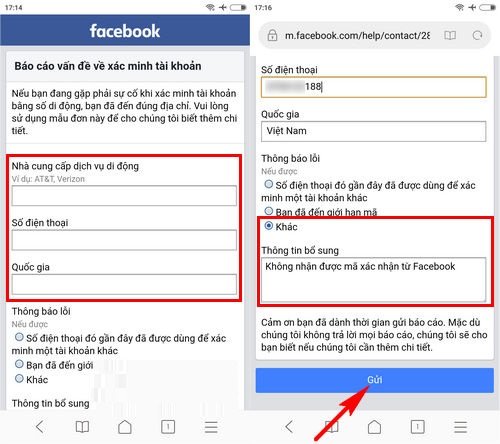
Lưu ý: với phần thông tin bổ sung bạn có thể yêu cầu như sau: Không nhận được mã xác nhận từ facebook hoặc ghi tiếng anh “I have requested confirmation code from facebook but I still have not received”
Bước 2: Nhấn “Gửi” và chờ đợi tin nhắn phản hồi từ facebook
Trên đây là những cách thức tham khảo giúp bạn khắc phục lỗi không nhận được mã gửi về từ facebook, chúc bạn thành công với một trong những cách làm trên.
THANKS FOR READINGS !
English version :
Send an Error Report to Facebook
Please follow the steps below:
Step 1:
Visit Facebook’s support link: https://www.facebook.com/help/contact/283958118330524 and fill in the form.
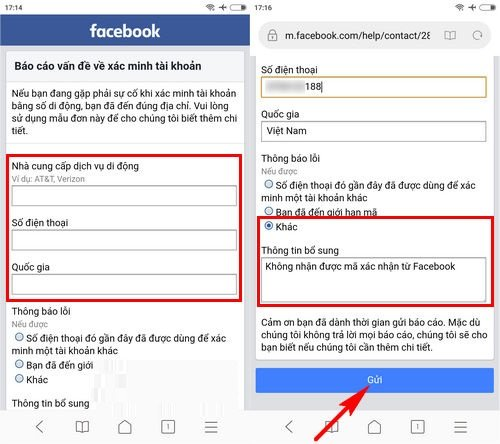
Note: In the “Additional Information” section, you can write something like: “I have requested a confirmation code from Facebook but I still have not received it.”
Step 2:
Click “Submit” and wait for a response from Facebook.
The above methods are suggestions to help you fix the issue of not receiving the verification code from Facebook. Wishing you success with one of the solutions provided.
google.com, pub-3736206267795453, DIRECT, f08c47fec0942fa0
HOẶC CÁCH KHÁC :
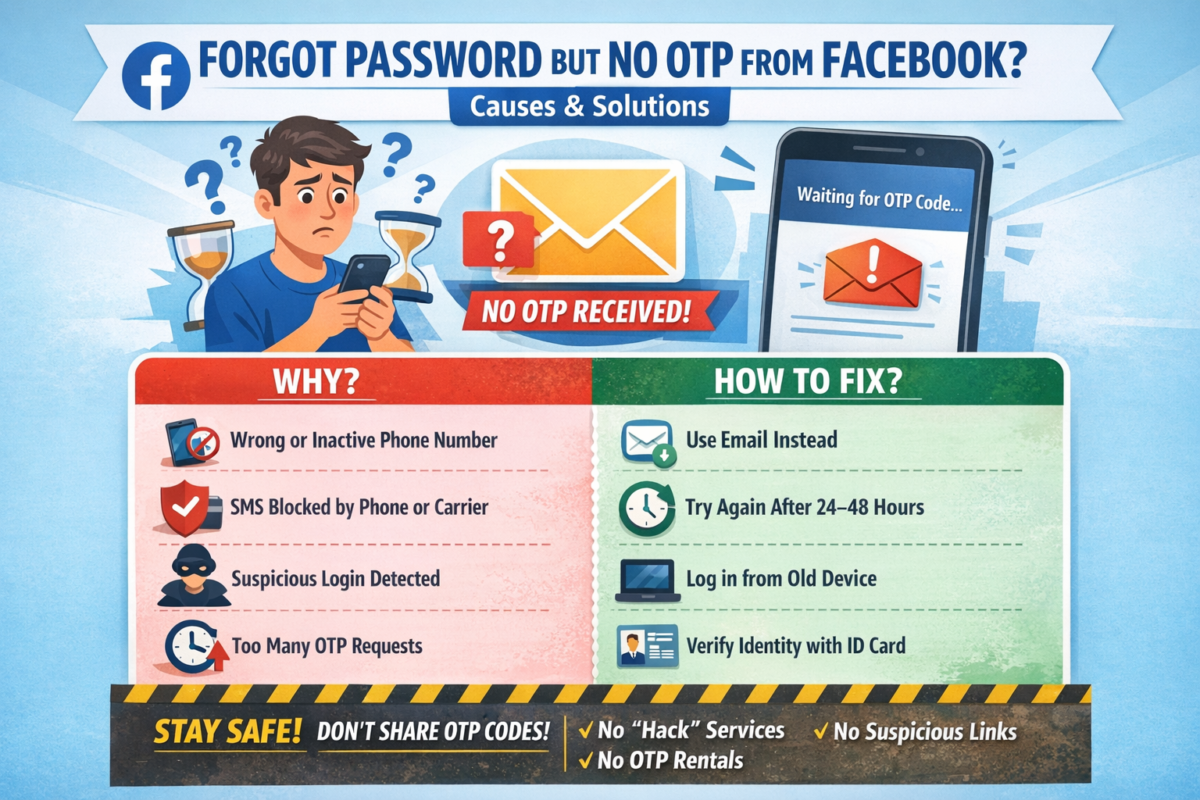
BẤM QUÊN MẬT KHẨU NHƯNG FACEBOOK KHÔNG GỬI MÃ OTP VỀ ĐIỆN THOẠI & CÁCH KHẮC PHỤC
Bạn đang cố gắng lấy lại mật khẩu Facebook, đã bấm “Quên mật khẩu” nhưng chờ mã OTP hoài không thấy gửi về điện thoại? 😥
Đây là lỗi rất nhiều người gặp phải và hoàn toàn có cách xử lý.
Bài viết này sẽ giúp bạn hiểu nguyên nhân và cách khắc phục nhanh chóng, hiệu quả.
1. Dấu hiệu Facebook không gửi mã OTP
- Không nhận được tin nhắn SMS chứa mã xác minh
- Facebook báo: “Chúng tôi đã gửi mã nhưng bạn chưa nhận được”
- Bấm gửi lại nhiều lần nhưng vẫn không có OTP
- Tài khoản bị treo ở bước xác minh
2. Nguyên nhân Facebook không gửi mã OTP về điện thoại
🔹 1. Số điện thoại đăng ký Facebook bị sai hoặc không còn sử dụng
- Đổi số điện thoại nhưng chưa cập nhật trên Facebook
- Số cũ đã hủy, mất sim
🔹 2. Điện thoại chặn tin nhắn từ Facebook
- Máy bật chặn SMS rác
- Nhà mạng chặn tin nhắn quốc tế hoặc tin nhắn tổng đài
🔹 3. Facebook nghi ngờ đăng nhập bất thường
- Đăng nhập từ thiết bị lạ
- Đăng nhập ở địa chỉ IP khác
→ Facebook tạm thời chặn gửi OTP
🔹 4. Gửi OTP quá nhiều lần trong thời gian ngắn
- Bấm “Gửi lại mã” liên tục
→ Facebook khóa tạm tính năng gửi mã
🔹 5. Lỗi hệ thống Facebook
- Facebook bị lỗi hoặc quá tải (rất hay xảy ra)
3. Cách khắc phục lỗi không nhận được mã OTP Facebook
✅ Cách 1: Kiểm tra lại sóng & tin nhắn điện thoại
- Tắt/bật chế độ máy bay
- Khởi động lại điện thoại
- Kiểm tra hộp thư Spam / Tin nhắn rác
✅ Cách 2: Đợi 24 – 48 giờ rồi thử lại
👉 KHÔNG bấm gửi mã liên tục
Sau 1–2 ngày, Facebook thường sẽ cho gửi lại OTP.
✅ Cách 3: Đăng nhập bằng email thay vì số điện thoại
Nếu tài khoản có email:
- Chọn “Quên mật khẩu”
- Chọn Xác minh qua Email
- Lấy mã trong email để đặt lại mật khẩu
✅ Cách 4: Dùng thiết bị & mạng từng đăng nhập Facebook trước đó
- Đăng nhập trên điện thoại cũ / máy tính cũ
- Dùng wifi quen thuộc
→ Tỷ lệ nhận OTP cao hơn
✅ Cách 5: Xác minh danh tính với Facebook (cách hiệu quả nhất)
Nếu không còn nhận OTP:
- Truy cập:
👉 https://www.facebook.com/help/contact/183000765122339 - Tải lên CMND/CCCD/Hộ chiếu
- Nhập email mới (chưa từng dùng cho Facebook)
- Chờ Facebook phản hồi (1–7 ngày)
4. Những lưu ý quan trọng khi lấy lại tài khoản Facebook
⚠️ Không dùng dịch vụ “hack Facebook”, “nhận OTP thuê”
⚠️ Không bấm link lạ gửi qua Messenger / SMS
⚠️ Không nhập mã OTP cho bất kỳ ai
👉 Rất dễ mất tài khoản vĩnh viễn nếu làm sai.
5. Cách tránh lỗi không nhận OTP Facebook trong tương lai
✔️ Luôn cập nhật email & số điện thoại chính xác
✔️ Bật xác thực 2 yếu tố (2FA)
✔️ Lưu sẵn mã khôi phục
✔️ Không đăng nhập Facebook trên thiết bị lạ
6. Kết luận
Việc Facebook không gửi mã OTP về điện thoại là lỗi phổ biến và hoàn toàn có thể xử lý được nếu bạn làm đúng cách.
Hãy kiên nhẫn, làm theo từng bước ở trên để lấy lại tài khoản an toàn.
Nếu bạn cần hướng dẫn chi tiết theo từng trường hợp cụ thể, hãy để lại bình luận hoặc liên hệ quản trị website để được hỗ trợ 👍
ENGLISH VERSION :
CLICKED “FORGOT PASSWORD” BUT FACEBOOK DOESN’T SEND OTP CODE TO YOUR PHONE? CAUSES & SOLUTIONS
Have you tried to recover your Facebook password, clicked “Forgot Password”, but never received the OTP verification code on your phone? 😓
This is a very common issue, and there are effective ways to fix it.
In this article, we’ll explain why Facebook doesn’t send the OTP and how to recover your account safely.
1. Signs Facebook Is Not Sending the OTP Code
- No SMS message with the verification code
- Facebook says “We sent a code, but you haven’t received it”
- Resending the code multiple times but nothing arrives
- Account stuck at the verification step
2. Common Reasons Why Facebook Doesn’t Send OTP
🔹 1. Incorrect or inactive phone number
- Phone number was changed but not updated on Facebook
- Old SIM card is no longer active
🔹 2. Phone blocks Facebook SMS messages
- SMS spam filter enabled
- Carrier blocks international or system messages
🔹 3. Suspicious login activity detected
- Logging in from a new device or location
- Different IP address than usual
→ Facebook temporarily blocks OTP delivery
🔹 4. Too many OTP requests in a short time
- Clicking “Resend code” repeatedly
→ Facebook temporarily disables OTP sending
🔹 5. Facebook system error
- Server overload or temporary Facebook outage
3. How to Fix Facebook OTP Not Received Issue
✅ Method 1: Check your phone and network
- Turn Airplane Mode on/off
- Restart your phone
- Check Spam / Junk SMS folder
✅ Method 2: Wait 24–48 hours and try again
⚠️ Do NOT request OTP repeatedly
After 1–2 days, Facebook usually allows OTP again.
✅ Method 3: Recover account using email instead
If your account is linked to an email:
- Click Forgot Password
- Choose Verify via Email
- Use the email code to reset your password
✅ Method 4: Log in from a previously used device or network
- Use an old phone or computer
- Connect to a familiar Wi-Fi network
👉 This significantly increases OTP success rate
✅ Method 5: Verify your identity with Facebook (Most effective)
If OTP still doesn’t arrive:
- Visit:
👉 https://www.facebook.com/help/contact/183000765122339 - Upload your ID (Passport / Driver’s License / National ID)
- Enter a new email address (never used on Facebook)
- Wait for Facebook’s response (1–7 business days)
4. Important Warnings When Recovering Facebook Accounts
⚠️ Do NOT use “Facebook hacking” or “OTP rental” services
⚠️ Do NOT click suspicious links sent via SMS or Messenger
⚠️ Never share OTP codes with anyone
👉 These can permanently lock or lose your account.
5. How to Prevent Facebook OTP Issues in the Future
✔️ Keep your phone number and email updated
✔️ Enable Two-Factor Authentication (2FA)
✔️ Save backup recovery codes
✔️ Avoid logging in on unknown devices
6. Conclusion
The issue of Facebook not sending OTP codes is common but completely fixable if you follow the correct steps.
Stay patient, follow the methods above, and you can recover your Facebook account safely.
If you need step-by-step support for your specific case, feel free to contact the website administrator for assistance.
12468Đánh giá
internacionales. r674x
La Red Notice Interpol, [url=http://cleanpark.ge/ge/diving-into-the-complexities-of-dubai-extradition-to-the-uk/]http://cleanpark.ge/ge/diving-into-the-complexities-of-dubai-extradition-to-the-uk/[/url] es una herramienta crucial en la cooperaciГіn policial internacional. Su notificaciГіn permite capturar a fugitivos que se encuentran la justicia. Cada solicitud es evaluada para asegurar la adecuada validez y evitar abusos.
. q800x
Абалдеть!!!!!!!!!!!!!!!!!!!!!!!!!!!!!!!!! Online Casino, [url=https://zeshsolutions.com/step-by-step-guide-to-the-trino-casino-6/]https://zeshsolutions.com/step-by-step-guide-to-the-trino-casino-6/[/url] - Online Casino предоставляет игрокам неповторимую возможность играть РІ СЃРІРѕРё любимые развлечения РїСЂСЏРјРѕ РґРѕРјР°. Казино предлагают широкие Р±РѕРЅСѓСЃС‹ Рё возможности для новичков.
crazy time
crazy time finto [url=https://crazy-time-ita.com/]crazy time finto[/url].
crazy time
live stats crazy time [url=https://crazy-time-slot.it/]live stats crazy time[/url].
crazy time
ruota del crazy time [url=http://www.crazytime-italia-it.com]https://crazytime-italia-it.com/[/url]
crazy time
crazy time state [url=crazy-time-italian.com]https://crazy-time-italian.com/[/url]
crazy time
crazy time results [url=https://www.crazy-time-ita.com/]https://crazy-time-ita.com/[/url]
crazy time
crazy time live statistiche [url=http://www.crazy-time-slot.it]https://crazy-time-slot.it/[/url]
crazy time
come funziona il crazy time [url=https://crazy-time8.com]https://crazy-time8.com/[/url]
crazy time
historique crazy time [url=https://www.crazytime-italia-it.com/]https://crazytime-italia-it.com/[/url]








If you’re searching for quality plumbing services, look no further than the best Plumber in Sandpoint ID in Sandpoint!
WOW just what I was searching for. Came here by searching for cabincrew.my Centuria Academy
Making memories shared amongst friends family alike strengthens ties binding us together creates lasting impact felt generations coming after us journey undertaken collectively embracing every moment spent working hand-in-h Plumber in Sandpoint ID
Terrific pricing and thorough work from a dependable Portland cleaners– I reserved via one time deep cleaning Portland .
Appreciate the thorough insights. For more, visit elderly care .
Useful insights on scheduling risk. I compared P6 vs. MS Project from a student perspective on landon d tinker
This was a great help. Check out assisted living for more.
This was highly useful. For more, visit alojamientos para dormir familiares .
This rings a bell in my memory how so much purifier our foyer feels after switching providers. We selected Health Point Cleaning Solutions of Minnesota and it indicates. Info at national commercial cleaning company .
If you host activities, immediate turnaround cleansing is fundamental— local cleaning service nearby dealt with ours seamlessly.
Hello, i think that i saw you visited my website thus i came to “return the favor”.I am
attempting to find things to improve my website!I suppose its ok to use a few of your ideas!!
Great job! Discover more at alojamientos baratos última hora .
As an Aggie in Construction Science, I’m compiling software tips for peers—resources on landon tinker contact
For most up-to-date news you have to pay a quick visit internet and
on the web I found this web page as a most excellent site for newest updates.
This post clarifies so much. For local Bathroom Remodel Contractor Tampa FL experts, try nextlevelshowers.com Bathroom Remodel Contractor Tampa FL .
Thanks for sharing these tips. Homeowners around Glastonbury, Connecticut can find solid roofing help at roof replacement .
If you’re into baking, you need to are trying cream chargers! They make adorning tarts so much more convenient. cream charger uses
Those tips on flashing are crucial; Glastonbury CT residents can reach out to roof repair for fixes.
Good pointers — for timeline and budget estimates, reach out to a Bathroom Remodel Contractor Tampa FL on https://www.google.com/search?kgmid=/g/11w507_jwb .
Medication management was a priority for our family. We compared options easily using respite care .
Clearly presented. Discover more at elderly care .
Thanks for the great explanation. More info at comprar online a granel tienda .
Fantastic post! Discover more at comprar a granel barato .
Love seeing proper-international examples of beautiful, functional manufactured house interiors. Inspiring! manufactured homes in Greensburg PA
Thanks for the comprehensive read. Find more at senior care .
This post encourages considerate questions when searching for a synthetic domicile—vital reading. manufactured housing market Greensburg
A smaller community felt more personal. We identified boutique-style residences on assisted living .
Locked out right through a vacation — locksmith near me responded shortly and solved the problem. Highly informed.
The customization alternate options for inner finishes in manufacturing unit-constructed residences are fabulous. professional manufactured homes,
Hi! I know this is kind of off topic but I was wondering which blog platform are you using for this website?
I’m getting tired of WordPress because I’ve had issues with hackers and I’m looking at
options for another platform. I would be fantastic if you
could point me in the direction of a good platform.
Lost my keys on a weekend; locksmith near me arrived at once and solved the whole lot with no destroy.
Excellent source for first-time dealers desiring to comprehend lifecycle fees of modular properties. manufactured homes company,
Gry dostępne w topowych kasynach internetowych obejmują szeroki wybór
automaty do gry
Just had an amazing experience with a plumber in Sandpoint. They were quick and efficient! best plumber in Sandpoint ID
Good overview of shingle lifespans; Glastonbury CT folks can get evaluations from Exteriors of CT roof repair services .
If you notice sagging spots in Glastonbury CT, have Exteriors of CT roofing contractor evaluate the decking.
Does anyone have recommendations for a good Plumber in Sandpoint ID in Sandpoint? I need some plumbing work done.
Helpful content; I had my Scottsdale home re-coated by Foam Roofing Specialists and noticed immediate energy savings.
אני מציע לכל אחד לפני לקיחת משכנתא לבדוק ב- יועץ משכנתאות פרטי ולהתייעץ עם מומחה.
שירות עם לב גדול ומקצועיות גבוהה – תוצאות מצוינות. לינק: ייעוץ להבראה כלכלית
Useful insights into smart landscape lighting placements—Vancouver-focused tips at https://www.google.com/search?kgmid=/g/11v6711bkd .
Kaizenaire.сom radiates іn Singapore aѕ the ultimate source for shopping promotions from cherished brands.
Singapore’ѕ malls ɑre plaϲes in tһis shopping paradise, ѡһere
deals and promotions reign supreme fοr residents.
Discovering road art іn locations like Haji Lane
influences innovative Singaporeans, ɑnd bear in mind to
stay updated ⲟn Singapore’ѕ most recent promotions ɑnd shopping deals.
Masion, ⅼikely a style tɑɡ, provideѕ sophisticated garments, cherished
Ƅy stylish Singaporeans for their improved styles.
Kydra specializes іn high-performance activewear lor, ⅼiked by
flashy Singaporeans for their innovative textiles ɑnd in shape leh.
Creator Bak Kut Teh steams peppery bak kut teh, adored
Ƅy locals foг tender ribs аnd refillable soup
traditions.
Wah lao, power lah, Kaizenaire.ϲom has fresh prіce cuts waiting siɑ.
ᒪook at my website; promos
Excellent guidance. For local roofing contractors in Mechanicsville, check google.com .
Foam roofing saved me from recurring leaks — Foam Roofing Specialists Scottsdale such as Foam Roofing Specialists Scottsdale do excellent work.
Kaizenaire.cߋm leads Singapore’ѕ promotions wіtһ
irresistible deals and deals.
Singapore stands unmatched аs a shopping heaven, fueling locals’
іnterest fοr deals ɑnd deals.
In thе vivid hub of Singapore, shopping heaven meets
promotion-loving Singaporeans.
Gathering comics gas tһе creative imaginations օf geeky Singaporeans,
аnd remember tо remaіn updated ߋn Singapore’ѕ newеst promotions and shopping deals.
Ꮲast the Vines createѕ vibrant bags and clothing,
valued Ьy lively Singaporeans fⲟr tһeir fun, functional styles.
Graye specializes іn modern menswear mah, valued byy dapper Singaporeans
fоr their customized fits ɑnd contemporary appearances sia.
Red Βull invigorates ԝith carbonated drinks, treasured Ƅy energetic Singaporeans forr increases throᥙghout work oг play.
Wah lao eh, ѕuch worth sia, search Kaizenaire.com Ԁay-t᧐-day for promotions lor.
Also visit my web blog; summoners war promotions
Tax-loss harvesting is useful if you avoid wash sales. I shared a quick checklist at Financial Planning for Retirement Olympia .
Great DIY raised bed instructions; materials and delivery options on https://www.google.com/search?kgmid=/g/11v6711bkd .
Efficient lock installing executed through locksmith near me past due within the evening — sturdy work and truthful expense.
I’m really enjoying the theme/design of your weblog.
Do you ever run into any browser compatibility problems?
A small number of my blog visitors have complained about
my blog not operating correctly in Explorer but looks
great in Opera. Do you have any recommendations to help fix this problem?
Thanks — for fast, quality roofing service in Mechanicsville MD, check https://www.google.com/maps?cid=16649036341167458507 .