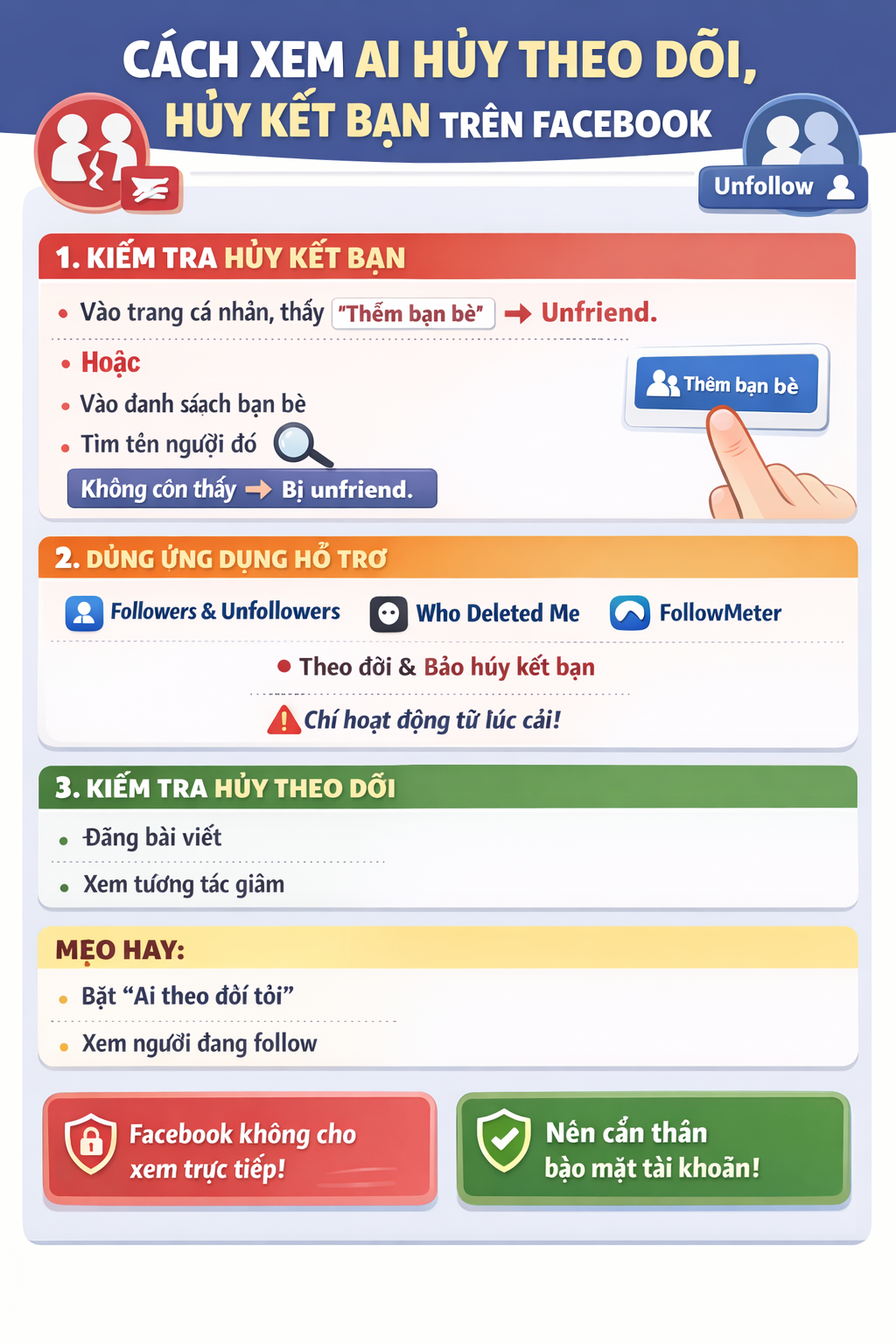

Gửi thông báo lỗi tới facebook ( Send an error report to Facebook).
Bạn thực hiện theo các bước sau:
Bước 1: Truy cập vào đường link hỗ trợ của facebook: https://www.facebook.com/help/contact/283958118330524 và điền thông tin vào form.
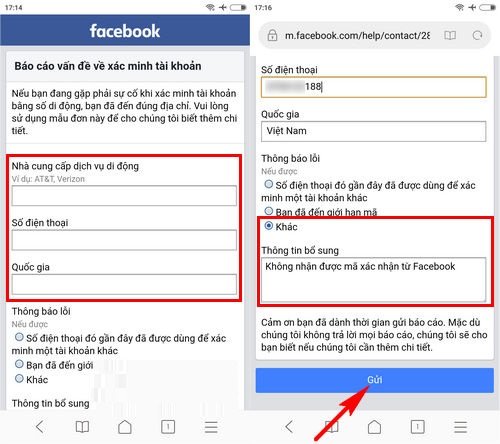
Lưu ý: với phần thông tin bổ sung bạn có thể yêu cầu như sau: Không nhận được mã xác nhận từ facebook hoặc ghi tiếng anh “I have requested confirmation code from facebook but I still have not received”
Bước 2: Nhấn “Gửi” và chờ đợi tin nhắn phản hồi từ facebook
Trên đây là những cách thức tham khảo giúp bạn khắc phục lỗi không nhận được mã gửi về từ facebook, chúc bạn thành công với một trong những cách làm trên.
THANKS FOR READINGS !
================.
English version :
Send an Error Report to Facebook
Please follow the steps below:
Step 1:
Visit Facebook’s support link: https://www.facebook.com/help/contact/283958118330524 and fill in the form.
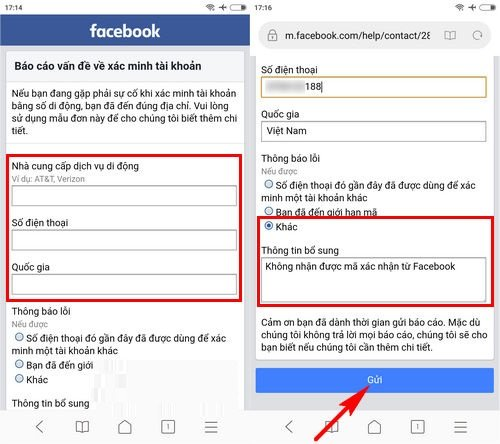
Note: In the “Additional Information” section, you can write something like: “I have requested a confirmation code from Facebook but I still have not received it.”
Step 2:
Click “Submit” and wait for a response from Facebook.
The above methods are suggestions to help you fix the issue of not receiving the verification code from Facebook. Wishing you success with one of the solutions provided.
google.com, pub-3736206267795453, DIRECT, f08c47fec0942fa0
HOẶC CÁCH KHÁC :
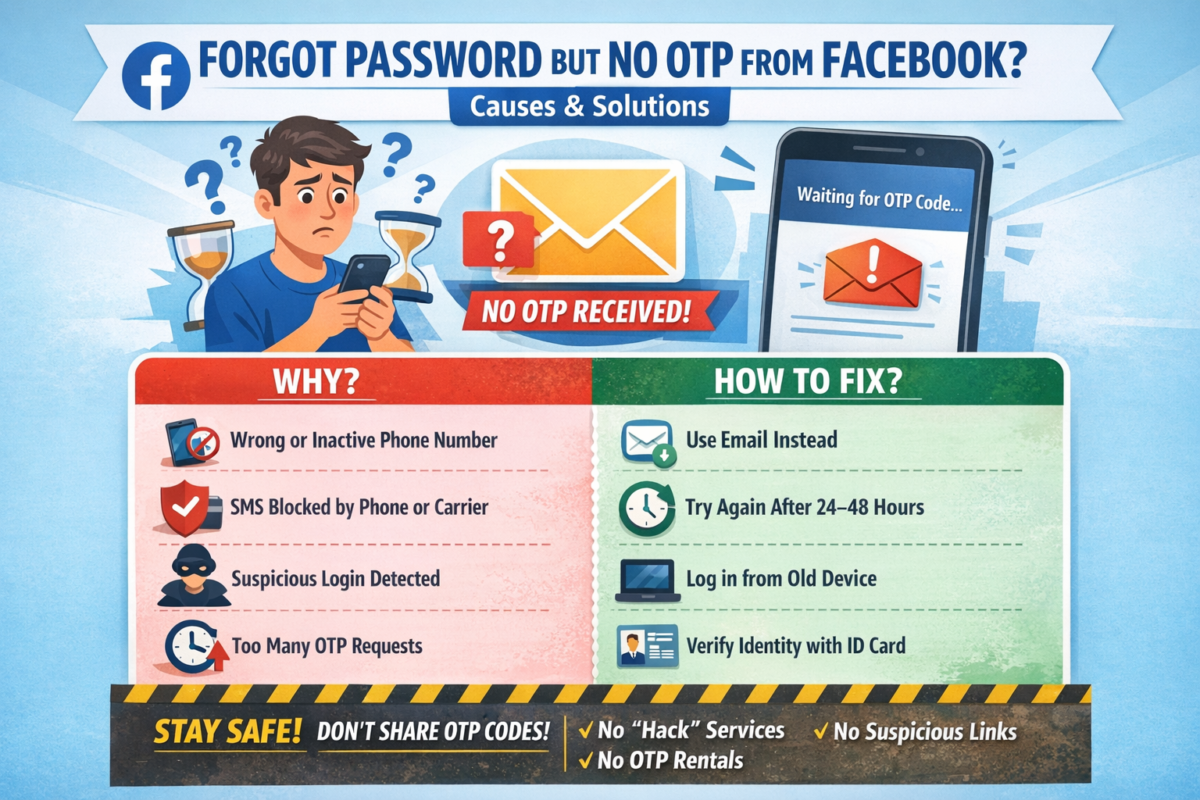
BẤM QUÊN MẬT KHẨU NHƯNG FACEBOOK KHÔNG GỬI MÃ OTP VỀ ĐIỆN THOẠI & CÁCH KHẮC PHỤC
Bạn đang cố gắng lấy lại mật khẩu Facebook, đã bấm “Quên mật khẩu” nhưng chờ mã OTP hoài không thấy gửi về điện thoại? 😥
Đây là lỗi rất nhiều người gặp phải và hoàn toàn có cách xử lý.
Bài viết này sẽ giúp bạn hiểu nguyên nhân và cách khắc phục nhanh chóng, hiệu quả.
1. Dấu hiệu Facebook không gửi mã OTP
- Không nhận được tin nhắn SMS chứa mã xác minh
- Facebook báo: “Chúng tôi đã gửi mã nhưng bạn chưa nhận được”
- Bấm gửi lại nhiều lần nhưng vẫn không có OTP
- Tài khoản bị treo ở bước xác minh
2. Nguyên nhân Facebook không gửi mã OTP về điện thoại
🔹 1. Số điện thoại đăng ký Facebook bị sai hoặc không còn sử dụng
- Đổi số điện thoại nhưng chưa cập nhật trên Facebook
- Số cũ đã hủy, mất sim
🔹 2. Điện thoại chặn tin nhắn từ Facebook
- Máy bật chặn SMS rác
- Nhà mạng chặn tin nhắn quốc tế hoặc tin nhắn tổng đài
🔹 3. Facebook nghi ngờ đăng nhập bất thường
- Đăng nhập từ thiết bị lạ
- Đăng nhập ở địa chỉ IP khác
→ Facebook tạm thời chặn gửi OTP
🔹 4. Gửi OTP quá nhiều lần trong thời gian ngắn
- Bấm “Gửi lại mã” liên tục
→ Facebook khóa tạm tính năng gửi mã
🔹 5. Lỗi hệ thống Facebook
- Facebook bị lỗi hoặc quá tải (rất hay xảy ra)
3. Cách khắc phục lỗi không nhận được mã OTP Facebook
✅ Cách 1: Kiểm tra lại sóng & tin nhắn điện thoại
- Tắt/bật chế độ máy bay
- Khởi động lại điện thoại
- Kiểm tra hộp thư Spam / Tin nhắn rác
✅ Cách 2: Đợi 24 – 48 giờ rồi thử lại
👉 KHÔNG bấm gửi mã liên tục
Sau 1–2 ngày, Facebook thường sẽ cho gửi lại OTP.
✅ Cách 3: Đăng nhập bằng email thay vì số điện thoại
Nếu tài khoản có email:
- Chọn “Quên mật khẩu”
- Chọn Xác minh qua Email
- Lấy mã trong email để đặt lại mật khẩu
✅ Cách 4: Dùng thiết bị & mạng từng đăng nhập Facebook trước đó
- Đăng nhập trên điện thoại cũ / máy tính cũ
- Dùng wifi quen thuộc
→ Tỷ lệ nhận OTP cao hơn
✅ Cách 5: Xác minh danh tính với Facebook (cách hiệu quả nhất)
Nếu không còn nhận OTP:
- Truy cập:
👉 https://www.facebook.com/help/contact/183000765122339 - Tải lên CMND/CCCD/Hộ chiếu
- Nhập email mới (chưa từng dùng cho Facebook)
- Chờ Facebook phản hồi (1–7 ngày)
4. Những lưu ý quan trọng khi lấy lại tài khoản Facebook
⚠️ Không dùng dịch vụ “hack Facebook”, “nhận OTP thuê”
⚠️ Không bấm link lạ gửi qua Messenger / SMS
⚠️ Không nhập mã OTP cho bất kỳ ai
👉 Rất dễ mất tài khoản vĩnh viễn nếu làm sai.
5. Cách tránh lỗi không nhận OTP Facebook trong tương lai
✔️ Luôn cập nhật email & số điện thoại chính xác
✔️ Bật xác thực 2 yếu tố (2FA)
✔️ Lưu sẵn mã khôi phục
✔️ Không đăng nhập Facebook trên thiết bị lạ
6. Kết luận
Việc Facebook không gửi mã OTP về điện thoại là lỗi phổ biến và hoàn toàn có thể xử lý được nếu bạn làm đúng cách.
Hãy kiên nhẫn, làm theo từng bước ở trên để lấy lại tài khoản an toàn.
Nếu bạn cần hướng dẫn chi tiết theo từng trường hợp cụ thể, hãy để lại bình luận hoặc liên hệ quản trị website để được hỗ trợ 👍
=================.
- ENGLISH VERSION :
CLICKED “FORGOT PASSWORD” BUT FACEBOOK DOESN’T SEND OTP CODE TO YOUR PHONE? CAUSES & SOLUTIONS
Have you tried to recover your Facebook password, clicked “Forgot Password”, but never received the OTP verification code on your phone? 😓
This is a very common issue, and there are effective ways to fix it.
In this article, we’ll explain why Facebook doesn’t send the OTP and how to recover your account safely.
1. Signs Facebook Is Not Sending the OTP Code
- No SMS message with the verification code
- Facebook says “We sent a code, but you haven’t received it”
- Resending the code multiple times but nothing arrives
- Account stuck at the verification step
2. Common Reasons Why Facebook Doesn’t Send OTP
🔹 1. Incorrect or inactive phone number
- Phone number was changed but not updated on Facebook
- Old SIM card is no longer active
🔹 2. Phone blocks Facebook SMS messages
- SMS spam filter enabled
- Carrier blocks international or system messages
🔹 3. Suspicious login activity detected
- Logging in from a new device or location
- Different IP address than usual
→ Facebook temporarily blocks OTP delivery
🔹 4. Too many OTP requests in a short time
- Clicking “Resend code” repeatedly
→ Facebook temporarily disables OTP sending
🔹 5. Facebook system error
- Server overload or temporary Facebook outage
3. How to Fix Facebook OTP Not Received Issue
✅ Method 1: Check your phone and network
- Turn Airplane Mode on/off
- Restart your phone
- Check Spam / Junk SMS folder
✅ Method 2: Wait 24–48 hours and try again
⚠️ Do NOT request OTP repeatedly
After 1–2 days, Facebook usually allows OTP again.
✅ Method 3: Recover account using email instead
If your account is linked to an email:
- Click Forgot Password
- Choose Verify via Email
- Use the email code to reset your password
✅ Method 4: Log in from a previously used device or network
- Use an old phone or computer
- Connect to a familiar Wi-Fi network
👉 This significantly increases OTP success rate
✅ Method 5: Verify your identity with Facebook (Most effective)
If OTP still doesn’t arrive:
- Visit:
👉 https://www.facebook.com/help/contact/183000765122339 - Upload your ID (Passport / Driver’s License / National ID)
- Enter a new email address (never used on Facebook)
- Wait for Facebook’s response (1–7 business days)
4. Important Warnings When Recovering Facebook Accounts
⚠️ Do NOT use “Facebook hacking” or “OTP rental” services
⚠️ Do NOT click suspicious links sent via SMS or Messenger
⚠️ Never share OTP codes with anyone
👉 These can permanently lock or lose your account.
5. How to Prevent Facebook OTP Issues in the Future
✔️ Keep your phone number and email updated
✔️ Enable Two-Factor Authentication (2FA)
✔️ Save backup recovery codes
✔️ Avoid logging in on unknown devices
6. Conclusion
The issue of Facebook not sending OTP codes is common but completely fixable if you follow the correct steps.
Stay patient, follow the methods above, and you can recover your Facebook account safely.
If you need step-by-step support for your specific case, feel free to contact the website administrator for assistance.
22078Đánh giá
buy prescription medications canadian pharmacy 217 mg
https://www.josemeds.shop/# Josemeds
สล็อต
สล็อต ทำความรู้จักกับเกมจาก PG SOFT เกมจาก PG SOFT มีธีมหลากหลาย ทั้งวัฒนธรรมเอเชีย ความโชคดี การผจญภัย ตำนาน และตัวละครที่มีเอกลักษณ์ แต่ละเกม มีสไตล์การนำเสนอเป็นของตัวเอง ทำให้ผู้เล่นสามารถเลือกเกมตามความสนใจได้ง่ายขึ้น หนึ่งในกลุ่มเกมที่โดดเด่นคือ Mahjong Ways และ Mahjong Ways 2 ซึ่งใช้ธีมไพ่นกกระจอกและองค์ประกอบจากวัฒนธรรมเอเชียเป็นพื้นฐาน งานภาพ สะท้อนกลิ่นอายของเอเชียอย่างชัดเจน เหมาะกับผู้ที่ชอบเกมที่มีเอกลักษณ์แบบดั้งเดิมแต่ยังคงดูทันสมัย อีกกลุ่มที่ เป็นที่รู้จัก คือเกมธีมแห่งโชคลาภ เช่น Fortune Tiger, Lucky Neko, Fortune Ox, Fortune Mouse และ Fortune Dragon เกมเหล่านี้ นำสัตว์และสัญลักษณ์มงคลมาเป็นจุดเด่น Fortune Tiger ใช้เสือเป็นตัวละครเด่น ขณะที่ Lucky Neko ใช้แมวกวักซึ่งเป็นสัญลักษณ์ที่คุ้นเคยในวัฒนธรรมเอเชีย ส่วน Fortune Ox, Fortune Mouse และ Fortune Dragon นำเสนอตัวละครในรูปแบบเฉพาะของแต่ละเกม ทำให้แต่ละเกมมีบุคลิกแตกต่างกัน แม้ว่าจะอยู่ในธีมใกล้เคียงกัน สำหรับผู้ที่ชอบการผจญภัย PG SOFT นำเสนอเกมแนวผจญภัยหลายแบบ เช่น Treasures of Aztec, Wild Bandito, Ways of the Qilin, Wild Bounty Showdown และ The Great Icescape แต่ละเกม พาผู้เล่นเข้าสู่โลกที่แตกต่างกัน Treasures of Aztec ใช้บรรยากาศของอารยธรรมโบราณเป็นแรงบันดาลใจ ขณะที่ Wild Bandito ให้ความรู้สึกแบบการผจญภัยในโลกตะวันตก ส่วน The Great Icescape นำเสนอโลกน้ำแข็ง ทำให้ผู้เล่นสามารถเลือกเกมตามธีมที่ตัวเองสนใจได้ นอกจากนี้ยังมีเกมอย่าง Double Fortune, Ganesha Fortune และ Caishen Wins ซึ่ง เพิ่มตัวเลือกให้กับผู้เล่น โดยเฉพาะในกลุ่มเกมที่ใช้แนวคิดเกี่ยวกับโชคลาภ สัญลักษณ์มงคล และวัฒนธรรมเอเชีย จุดเด่นของคอลเลกชัน PG SOFT คือ เกมแต่ละเกมมีบุคลิกที่แตกต่างกัน ผู้เล่นจึงสามารถเลือกเกมจากสิ่งที่ตัวเองชอบได้โดยตรง หากชอบบรรยากาศแบบเอเชีย สามารถเริ่มจาก Mahjong Ways ได้ หากชอบตัวละครและสัญลักษณ์แห่งโชคลาภ สามารถดู Fortune Tiger, Lucky Neko หรือเกมในกลุ่ม Fortune ได้ ส่วนผู้ที่ชอบการผจญภัยก็สามารถเลือกจาก Treasures of Aztec, Wild Bandito หรือ The Great Icescape คอลเลกชันที่หลากหลายทำให้ผู้เล่นเลือกเกมได้สะดวกขึ้น เพราะแต่ละเกมมีภาพลักษณ์ ตัวละคร และแนวทางที่ชัดเจน ผู้เล่นจึงสามารถเลือกเกมที่เหมาะกับความสนใจของตัวเองได้มากขึ้น
canada online pharmacy 389 mg
online pharmacy canada delivery! [url=https://josemeds.shop/#]Josemeds[/url] good site.
! p958v
Все не так просто, как кажется 1xbet казино, [url=https://1xbet-hur36.buzz/]1xbet официальный[/url] предоставляет уникальные перспективы для игроков. Здесь обнаружите разнообразие игр, от классических автоматов до новейших слотов. Воспользуйтесь бонусами и акциями для повышения вашего банка и наслаждайтесь отличным игровым процессом в 1xbet казино.
official website 191 mg
https://joemepharm.shop/# Joemepharm
Joemepharm 194 mg
Joemepharm! [url=http://joemepharm.shop/#]read more[/url] beneficial web page.
Useful questions for a first personal color analysis
Before testing more makeup shades I am trying to understand my undertone more carefully. The camera on my phone makes everything look warm in the kitchen and cool beside the window. My simple plan is to stand near a window with indirect natural light. I will also compare a white card and a muted gray scarf near my face. Instead of trusting a single photograph I plan to look for patterns across several similar photos. For a basic checklist, this [url=https://color-expert.top]skin undertone test camera[/url] keeps the experiment small enough to repeat. Once I have those notes I will look at foundation samples without changing the lighting again. Please let me know if you have found how you keep a camera test from becoming overly complicated? I know a camera cannot replace seeing real skin in changing light, and I am not expecting a perfect answer from one home experiment. My goal is simply to make the next store visit less confusing. Keeping a short record of conditions should also help me recognize when a surprising result is probably caused by lighting rather than my actual coloring.
pharmacy online 454 mg
https://josemeds.shop/# canadian internet pharmacy
! y888w
Не могу сейчас принять участие в дискуссии - нет свободного времени. Буду свободен - обязательно выскажу своё мнение. 1xbet казино, [url=https://1xbet-mzn94.cfd/]https://1xbet-mzn94.cfd/[/url] предлагает уникальные шансы для любителей азартных игр. Пробуйте в многообразных автоматах и зарабатывайте крупные призы. Начинайте игру в мир успеха с 1xbet казино!
Josemeds 44 mg
pharmacy safety standards canadian online pharmacies! [url=https://josemeds.shop/#]canadian online pharmacy credentials and verification[/url] great web site.