
Gửi thông báo lỗi tới facebook ( Send an error report to Facebook).
Bạn thực hiện theo các bước sau:
Bước 1: Truy cập vào đường link hỗ trợ của facebook: https://www.facebook.com/help/contact/283958118330524 và điền thông tin vào form.
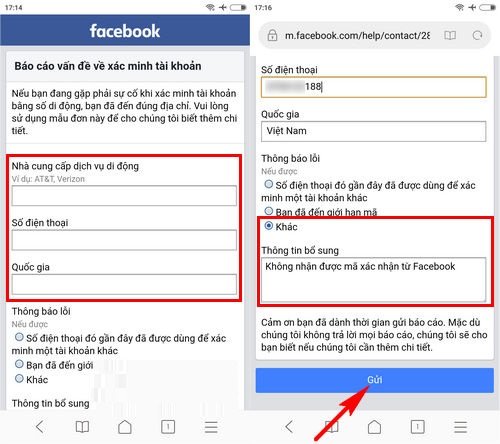
Lưu ý: với phần thông tin bổ sung bạn có thể yêu cầu như sau: Không nhận được mã xác nhận từ facebook hoặc ghi tiếng anh “I have requested confirmation code from facebook but I still have not received”
Bước 2: Nhấn “Gửi” và chờ đợi tin nhắn phản hồi từ facebook
Trên đây là những cách thức tham khảo giúp bạn khắc phục lỗi không nhận được mã gửi về từ facebook, chúc bạn thành công với một trong những cách làm trên.
THANKS FOR READINGS !
================.
English version :
Send an Error Report to Facebook
Please follow the steps below:
Step 1:
Visit Facebook’s support link: https://www.facebook.com/help/contact/283958118330524 and fill in the form.
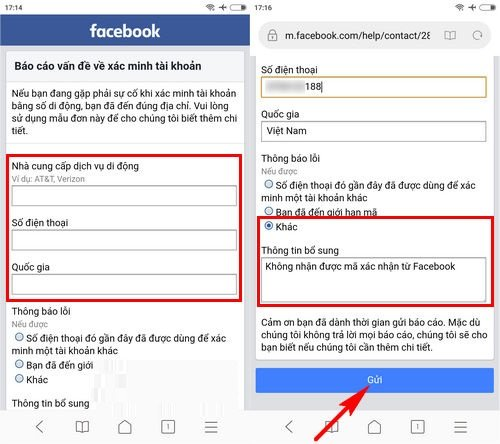
Note: In the “Additional Information” section, you can write something like: “I have requested a confirmation code from Facebook but I still have not received it.”
Step 2:
Click “Submit” and wait for a response from Facebook.
The above methods are suggestions to help you fix the issue of not receiving the verification code from Facebook. Wishing you success with one of the solutions provided.
google.com, pub-3736206267795453, DIRECT, f08c47fec0942fa0
HOẶC CÁCH KHÁC :
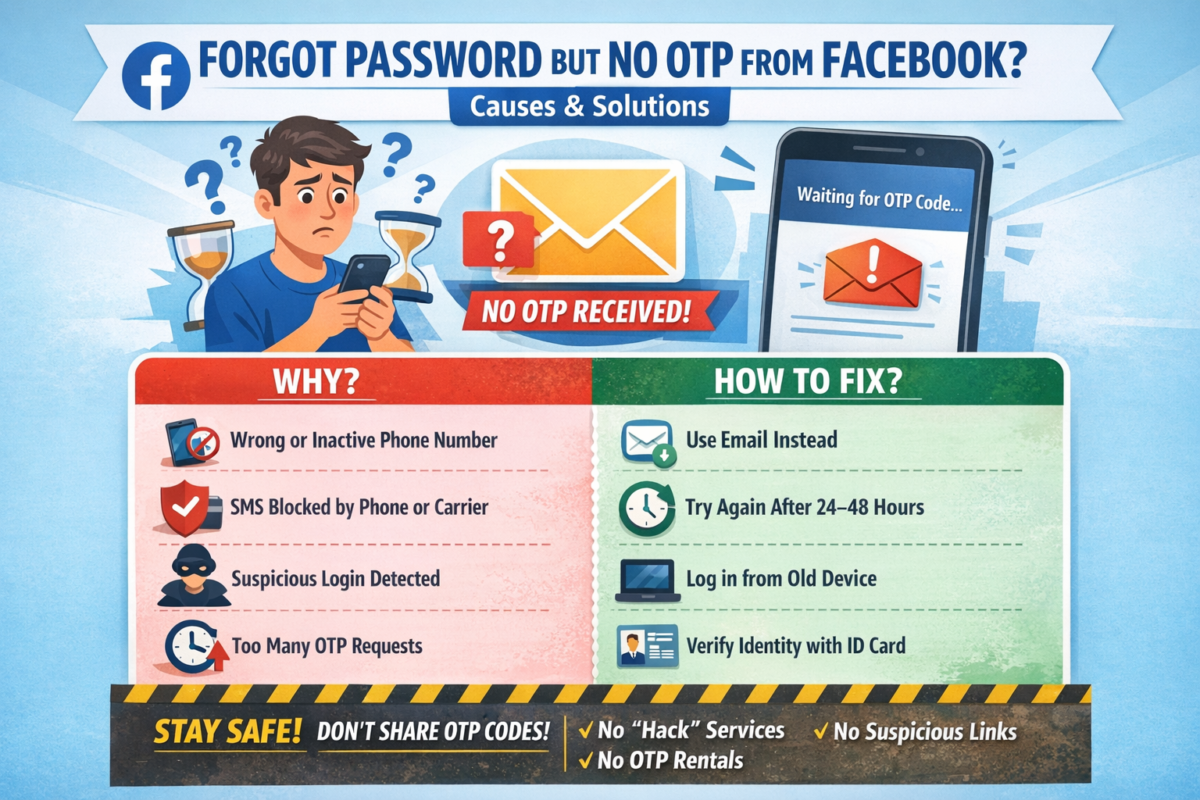
BẤM QUÊN MẬT KHẨU NHƯNG FACEBOOK KHÔNG GỬI MÃ OTP VỀ ĐIỆN THOẠI & CÁCH KHẮC PHỤC
Bạn đang cố gắng lấy lại mật khẩu Facebook, đã bấm “Quên mật khẩu” nhưng chờ mã OTP hoài không thấy gửi về điện thoại? 😥
Đây là lỗi rất nhiều người gặp phải và hoàn toàn có cách xử lý.
Bài viết này sẽ giúp bạn hiểu nguyên nhân và cách khắc phục nhanh chóng, hiệu quả.
1. Dấu hiệu Facebook không gửi mã OTP
- Không nhận được tin nhắn SMS chứa mã xác minh
- Facebook báo: “Chúng tôi đã gửi mã nhưng bạn chưa nhận được”
- Bấm gửi lại nhiều lần nhưng vẫn không có OTP
- Tài khoản bị treo ở bước xác minh
2. Nguyên nhân Facebook không gửi mã OTP về điện thoại
🔹 1. Số điện thoại đăng ký Facebook bị sai hoặc không còn sử dụng
- Đổi số điện thoại nhưng chưa cập nhật trên Facebook
- Số cũ đã hủy, mất sim
🔹 2. Điện thoại chặn tin nhắn từ Facebook
- Máy bật chặn SMS rác
- Nhà mạng chặn tin nhắn quốc tế hoặc tin nhắn tổng đài
🔹 3. Facebook nghi ngờ đăng nhập bất thường
- Đăng nhập từ thiết bị lạ
- Đăng nhập ở địa chỉ IP khác
→ Facebook tạm thời chặn gửi OTP
🔹 4. Gửi OTP quá nhiều lần trong thời gian ngắn
- Bấm “Gửi lại mã” liên tục
→ Facebook khóa tạm tính năng gửi mã
🔹 5. Lỗi hệ thống Facebook
- Facebook bị lỗi hoặc quá tải (rất hay xảy ra)
3. Cách khắc phục lỗi không nhận được mã OTP Facebook
✅ Cách 1: Kiểm tra lại sóng & tin nhắn điện thoại
- Tắt/bật chế độ máy bay
- Khởi động lại điện thoại
- Kiểm tra hộp thư Spam / Tin nhắn rác
✅ Cách 2: Đợi 24 – 48 giờ rồi thử lại
👉 KHÔNG bấm gửi mã liên tục
Sau 1–2 ngày, Facebook thường sẽ cho gửi lại OTP.
✅ Cách 3: Đăng nhập bằng email thay vì số điện thoại
Nếu tài khoản có email:
- Chọn “Quên mật khẩu”
- Chọn Xác minh qua Email
- Lấy mã trong email để đặt lại mật khẩu
✅ Cách 4: Dùng thiết bị & mạng từng đăng nhập Facebook trước đó
- Đăng nhập trên điện thoại cũ / máy tính cũ
- Dùng wifi quen thuộc
→ Tỷ lệ nhận OTP cao hơn
✅ Cách 5: Xác minh danh tính với Facebook (cách hiệu quả nhất)
Nếu không còn nhận OTP:
- Truy cập:
👉 https://www.facebook.com/help/contact/183000765122339 - Tải lên CMND/CCCD/Hộ chiếu
- Nhập email mới (chưa từng dùng cho Facebook)
- Chờ Facebook phản hồi (1–7 ngày)
4. Những lưu ý quan trọng khi lấy lại tài khoản Facebook
⚠️ Không dùng dịch vụ “hack Facebook”, “nhận OTP thuê”
⚠️ Không bấm link lạ gửi qua Messenger / SMS
⚠️ Không nhập mã OTP cho bất kỳ ai
👉 Rất dễ mất tài khoản vĩnh viễn nếu làm sai.
5. Cách tránh lỗi không nhận OTP Facebook trong tương lai
✔️ Luôn cập nhật email & số điện thoại chính xác
✔️ Bật xác thực 2 yếu tố (2FA)
✔️ Lưu sẵn mã khôi phục
✔️ Không đăng nhập Facebook trên thiết bị lạ
6. Kết luận
Việc Facebook không gửi mã OTP về điện thoại là lỗi phổ biến và hoàn toàn có thể xử lý được nếu bạn làm đúng cách.
Hãy kiên nhẫn, làm theo từng bước ở trên để lấy lại tài khoản an toàn.
Nếu bạn cần hướng dẫn chi tiết theo từng trường hợp cụ thể, hãy để lại bình luận hoặc liên hệ quản trị website để được hỗ trợ 👍
=================.
- ENGLISH VERSION :
CLICKED “FORGOT PASSWORD” BUT FACEBOOK DOESN’T SEND OTP CODE TO YOUR PHONE? CAUSES & SOLUTIONS
Have you tried to recover your Facebook password, clicked “Forgot Password”, but never received the OTP verification code on your phone? 😓
This is a very common issue, and there are effective ways to fix it.
In this article, we’ll explain why Facebook doesn’t send the OTP and how to recover your account safely.
1. Signs Facebook Is Not Sending the OTP Code
- No SMS message with the verification code
- Facebook says “We sent a code, but you haven’t received it”
- Resending the code multiple times but nothing arrives
- Account stuck at the verification step
2. Common Reasons Why Facebook Doesn’t Send OTP
🔹 1. Incorrect or inactive phone number
- Phone number was changed but not updated on Facebook
- Old SIM card is no longer active
🔹 2. Phone blocks Facebook SMS messages
- SMS spam filter enabled
- Carrier blocks international or system messages
🔹 3. Suspicious login activity detected
- Logging in from a new device or location
- Different IP address than usual
→ Facebook temporarily blocks OTP delivery
🔹 4. Too many OTP requests in a short time
- Clicking “Resend code” repeatedly
→ Facebook temporarily disables OTP sending
🔹 5. Facebook system error
- Server overload or temporary Facebook outage
3. How to Fix Facebook OTP Not Received Issue
✅ Method 1: Check your phone and network
- Turn Airplane Mode on/off
- Restart your phone
- Check Spam / Junk SMS folder
✅ Method 2: Wait 24–48 hours and try again
⚠️ Do NOT request OTP repeatedly
After 1–2 days, Facebook usually allows OTP again.
✅ Method 3: Recover account using email instead
If your account is linked to an email:
- Click Forgot Password
- Choose Verify via Email
- Use the email code to reset your password
✅ Method 4: Log in from a previously used device or network
- Use an old phone or computer
- Connect to a familiar Wi-Fi network
👉 This significantly increases OTP success rate
✅ Method 5: Verify your identity with Facebook (Most effective)
If OTP still doesn’t arrive:
- Visit:
👉 https://www.facebook.com/help/contact/183000765122339 - Upload your ID (Passport / Driver’s License / National ID)
- Enter a new email address (never used on Facebook)
- Wait for Facebook’s response (1–7 business days)
4. Important Warnings When Recovering Facebook Accounts
⚠️ Do NOT use “Facebook hacking” or “OTP rental” services
⚠️ Do NOT click suspicious links sent via SMS or Messenger
⚠️ Never share OTP codes with anyone
👉 These can permanently lock or lose your account.
5. How to Prevent Facebook OTP Issues in the Future
✔️ Keep your phone number and email updated
✔️ Enable Two-Factor Authentication (2FA)
✔️ Save backup recovery codes
✔️ Avoid logging in on unknown devices
6. Conclusion
The issue of Facebook not sending OTP codes is common but completely fixable if you follow the correct steps.
Stay patient, follow the methods above, and you can recover your Facebook account safely.
If you need step-by-step support for your specific case, feel free to contact the website administrator for assistance.
24138Đánh giá
Today! n631t
Эта версия устарела Casino Online Slots, [url=https://urban-houzz.com/webredesign/comprehensive-guide-to-the-magic-win-casino-2/]https://urban-houzz.com/webredesign/comprehensive-guide-to-the-magic-win-casino-2/[/url] offer entertainment for players worldwide. With countless themes and features, these machines cater to all tastes. Many providers also provide offers for new users, enhancing the gaming experience. Enjoy the adventure anytime, anywhere!
! b906c
Nel mondo del gioco, avventurieri si avventurano in pirots 4 casino, [url=https://www.lugonextlab.eu/scopri-i-bonus-di-pirots-4-avventure-e-premi-incredibili/]https://www.lugonextlab.eu/scopri-i-bonus-di-pirots-4-avventure-e-premi-incredibili/[/url], in perseguimento di fortune e avventure uniche. Le gare sono avvincenti, e ogni tornata offre nuove emozioni. Esplorare le meraviglie dei pirots ГЁ un'esperienza memorabile. Batti la fortuna e realizza i tuoi sogni nel Pirots 4 Casino!
навес для двух автомобилей
Ищете надежный [url=https://www.naves-na-dve-mashiny.ru/]навес на две машины цена с установкой под ключ[/url], который обеспечит защиту ваших автомобилей и прослужит многие годы? Навес занимает меньше пространства, чем полноценный гараж, и делает парковку более удобной и организованной. Опоры могут быть металлическими, деревянными или бетонными в зависимости от проектных требований. Поликарбонат обеспечивает легкость конструкции и пропускает естественный свет, делая пространство светлым. Поддержание навеса в рабочем состоянии требует систематического ухода, особенно в холодный сезон.
. a562c
Онлайн-казино привлекают игроков множеством игр и удивительными бонусами. Особенно интересен bonus cassino online, [url=https://lanechiro.com.au/is-your-home-office-doing-you-harm/]https://lanechiro.com.au/is-your-home-office-doing-you-harm/[/url], который позволяет начать игру с дополнительными средствами. Геймеры имеют возможность активировать различные бонусы для увеличения шансов на успех.
Kraken даркнет зеркало поиск при блокировке основного
Для вашего удобства мы собрали действующие [url=https://go-pressforum.com/threads/kraken-darknet-vkhod-bezopasno-i-bystro.2434/]зеркала кракен[/url] и безопасные способы входа на ресурс KRAKEN. Ниже представлены [url=https://go-pressforum.com/threads/kraken-darknet-luchshiye-varianty-vkhoda.2433/]kraken официальный сайт[/url] и резервные зеркала платформы KRAKEN, которые гарантируют стабильный доступ. [b]Список рабочих адресов KRAKEN для перехода:[/b] Первое официальное зеркало KRAKEN: https://h2ports.eu/ https://cueto-frauenaerzte.de/ https://synspladsen.dk https://lescaboteursdelune.fr https://www.benzing-watertechnology.com https://lecarredelamariee.com https://dubai.abadraho.com [url=https://go-pressforum.com/threads/kraken-ssylka-rabochaya-obnovlennyye-adresa-dlya-stabil-nogo-dostupa-kak-nastroit-avtoperekhody-cherez-brauzernyye-rasshireniya.2482/]РІС…РѕРґ РЅР° сайт kraken[/url] https://wmcapital.fr https://atanasiocorreduria.es https://ifluencer.com https://wovax.com https://transvercors-nordic.com https://aliyn.pl https://tamhaber.org https://kanalciduranusta.com https://baskiliperde.com https://gebzetemizlik.net https://go-pressforum.com https://nauivanow.com https://colegiomascamarena.es https://www.gender-budgets.org https://arteoliva.com https://aerotermiazaragoza.es https://www.beachanimalrehab.com https://www.accesstohealthcare.org https://www.bunkertype.com [url=https://go-pressforum.com/threads/kraken-darknet-vkhod-bez-kapchi-i-blokirovok.2452/]кракен рабочий сайт[/url] https://chemcorchemical.com https://edicioneswanafrica.com https://www.itineracarolusv.eu https://www.grzes-bus.pl https://kanadasienada.pl https://servigate.com https://americanlaser.us https://www.flipsandkicksplus.com https://www.virtualworldassistants.com https://www.juicingequipment.com https://cicmi.org https://visionmechanic.net https://greensky-eg.com https://fuadinc.com.br https://www.livia-benkova.eu https://www.sgpembalagens.com.br https://o-cello.com https://rocknus.com https://www.jeremywilmot.com.au https://www.4kenya.info https://www.4kenya.info/en/home https://drarealestate.com https://bookstore.au.edu https://www.vuijlsteke.be https://projectcars.com https://ciceroleather.com https://www.radarcreative.net https://www.ronosmena.com https://www.kinkyatoz.com https://www.staufen-inkasso.de https://danwalmsley.com https://www.parceljournal.org https://www.mlprintshop.com https://bonito-restaurant.com https://walnutihs.com https://sarasourcing.com https://institutondopastoreio.com.br https://jcainformatica.net.br https://creamycheesecakeco.com.au https://bambyjacafe.com.au https://cafesheba.com.au [url=https://go-pressforum.com/threads/kraken-darknet-vkhod-cherez-darknet-bez-kapchi.2421/]kraken marketplace ссылка[/url] [b]Подробная инструкция KRAKEN по безопасному входу и использованию: [/b] Подготовка браузера для доступа к KRAKEN. Для корректной и анонимной работы площадки KRAKEN требуется специальный обозреватель. Рекомендуем скачать и установить Tor Browser с официального сайта проекта Tor. Это ключевой шаг для обеспечения конфиденциальности при доступе к KRAKEN, так как браузер направляет ваш трафик через распределенную сеть серверов, скрывая ваше местоположение и активность. Запуск и подключение к сети для KRAKEN. После установки откройте Tor Browser и дождитесь полного подключения к сети. Иконка в верхней части окна браузера покажет статус соединения. Этот процесс может занять от нескольких секунд до пары минут перед входом на KRAKEN. Убедитесь, что подключение установлено успешно. Переход на сайт KRAKEN. В адресной строке запущенного браузера введите один из актуальных адресов KRAKEN, указанных выше (например, [url= ,L][/url] или [url= ,L][/url]), и перейдите по нему. Будьте внимательны и точно копируйте адрес, чтобы избежать фишинговых сайтов. Регистрация или авторизация на KRAKEN. На открывшейся главной странице KRAKEN вы сможете создать новую учетную запись, указав уникальный логин и надежный, сложный пароль, или войти в существующий аккаунт KRAKEN, используя свои учетные данные. Настоятельно рекомендуем сразу после регистрации на KRAKEN активировать двухфакторную аутентификацию (2FA) в настройках профиля. Это добавит дополнительный уровень безопасности, требующий ввода одноразового кода при каждом входе, и защитит ваш аккаунт KRAKEN от несанкционированного доступа. [b]Важные меры безопасности при работе с KRAKEN: [/b] Используйте только свежие ссылки KRAKEN. Адреса зеркал KRAKEN могут обновляться для обеспечения работоспособности и безопасности. Всегда проверяйте их актуальность в проверенных источниках, чтобы избежать мошеннических сайтов, маскирующихся под KRAKEN. Не сохраняйте ссылки в закладках надолго без проверки. Дополните анонимность VPN для доступа к KRAKEN. Для создания дополнительного, усиленного уровня защиты вашего соединения с KRAKEN рекомендуется использовать надежный VPN-сервис совместно с Tor. Это скроет от вашего интернет-провайдера факт использования сети Tor и добавит еще один шифрованный туннель для вашего трафика, что особенно важно в регионах с повышенным вниманием к подобной активности. Проверяйте репутацию контрагентов на KRAKEN. Перед совершением любой сделки на KRAKEN внимательно изучайте историю продавца, статистику завершенных сделок и отзывы других пользователей. Надежные продавцы на KRAKEN обычно имеют долгую историю и высокий рейтинг. Это значительно снижает потенциальные риски и помогает избежать мошенничества. Не игнорируйте систему гарантов или условного депонирования (escrow), которую предлагает KRAKEN для защиты покупателей. Критически оценивайте информацию. Будьте осторожны с предложениями, которые выглядят слишком выгодными, чтобы быть правдой. Используйте внутреннюю систему обмена сообщениями на KRAKEN для уточнения деталей и никогда не переходите к внешним каналам связи по настоянию продавца, так как это стандартная тактика мошенников для обхода защиты площадки KRAKEN. [b]Почему пользователи выбирают площадку KRAKEN? [/b] Маркетплейс KRAKEN заслужил доверие многочисленной аудитории благодаря сочетанию ключевых факторов. Во-первых, это широкий и разнообразный ассортимент, представленный сотнями продавцов. Во-вторых, интуитивно понятный интерфейс KRAKEN, который упрощает навигацию, поиск товаров и управление заказами даже для новых пользователей. В-третьих, продуманная система безопасных транзакций, включающая механизмы разрешения споров (диспутов) и возможность использования условного депонирования, что минимизирует риски для обеих сторон сделки. На KRAKEN функциональность сочетается с внимательным отношением к безопасности клиентов, что делает процесс покупок более предсказуемым, защищенным и, как следствие, популярным среди пользователей, ценящих анонимность и надежность. [b]Популярные поисковые запросы, связанные с доступом к KRAKEN:[/b] [b]Быстрый алгоритм действий для доступа к KRAKEN:[/b] 1. Установите Tor Browser с официального сайта. 2. Откройте браузер и дождитесь успешного подключения к сети Tor. 3. В адресной строке введите актуальный адрес KRAKEN: https://www.livia-benkova.eu 4. Пройдите регистрацию, создав уникальный логин и сложный пароль, или авторизуйтесь в системе KRAKEN. Немедленно включите двухфакторную аутентификацию в настройках вашего профиля KRAKEN. Для максимальной анонимности рассмотрите возможность использования VPN-сервиса перед запуском Tor Browser. Всегда проверяйте репутацию продавца по отзывам и рейтингу перед совершением сделки на KRAKEN. [url=https://go-pressforum.com/threads/kraken-ne-rabotayet-vozmozhnyye-prichiny-i-resheniya-pri-problemakh-s-dostupom-kak-svyazat-sya-s-podderzhkoi-cherez-ofitsial-nyye-kanaly.2477/]kraken маркетплейс[/url] [url=https://americanlaser.us]РІС…РѕРґ кракен[/url] [url=https://nauivanow.com]кракен ссылка onion[/url] [url=https://www.vuijlsteke.be]ссылка РЅР° кракен даркнет[/url] [url=https://chemcorchemical.com]kraken тор[/url] [url=https://greensky-eg.com]что такое кракен[/url] [url=https://www.virtualworldassistants.com]ссылка kraken[/url] [url=https://www.livia-benkova.eu]kraken darknet market[/url] [url=https://ifluencer.com]кракен телеграм[/url] [url=https://www.radarcreative.net]кракен сайт даркнет маркет[/url] [url=https://nauivanow.com]кракен даркнет[/url]
служба по контракту
Решив изменить жизнь, он подал документы и с гордостью подписал [url=https://svo-kontrakt-gid.ru/]вакансии министерство обороны[/url]. Все больше молодёжи рассматривает службу по контракту как реальную возможность получить стабильную работу и льготы.
Международные платежи
Предприниматели отзовитесь То комиссии бешеные А поставщики ждут оплату Короче, единственные кто помогает быстро — услуга международных платежей под ключ Поставщик получил оплату вовремя В общем, смотрите сами по ссылке — международные платежи и расчеты [url=https://prostoj.mezhdunarodnye-platezhi-sim.ru]международные платежи и расчеты[/url] Не мучайтесь с банками Перешлите тому кто работает с зарубежными поставщиками
Школа онлайн
Здорова родители Учителя которые только и знают что орать А эти поборы на подарки учителям Короче, школа без стресса и скандалов — школа онлайн дистанционное обучение с индивидуальным расписанием Учителя объясняют доходчиво В общем, сохраняйте себе — lbs [url=https://obrazovanie.shkola-onlajn-gtn.ru]lbs[/url] Хватит мучить себя и ребёнка Перешлите другим родителям
за считанные минуты a927z
И что в таком случае делать? 1win регистрация, [url=https://1win-axpt4.xyz/]1win-axpt4.xyz[/url] очень проста. Для того чтобы доступ к увлекательному миру ставок, всего лишь заполнить заявку. Выберите свой никнейм и ключ. После завершения вы будете в состоянии делать ставки!
. h907l
Мне очень жаль, ничем не могу помочь, но уверен, что Вам помогут найти правильное решение. 1xbet зеркало, [url=https://1xbet-yho35.cfd/]https://1xbet-yho35.cfd/[/url] предоставляет шанс пользователям воспользоваться платформу, при основной сайт закрыт. Это эффективный способ продолжать ставить на спорт. С помощью 1xbet зеркало практически просто, поэтому игроки могут успешно делать ставки.