
Gửi thông báo lỗi tới facebook ( Send an error report to Facebook).
Bạn thực hiện theo các bước sau:
Bước 1: Truy cập vào đường link hỗ trợ của facebook: https://www.facebook.com/help/contact/283958118330524 và điền thông tin vào form.
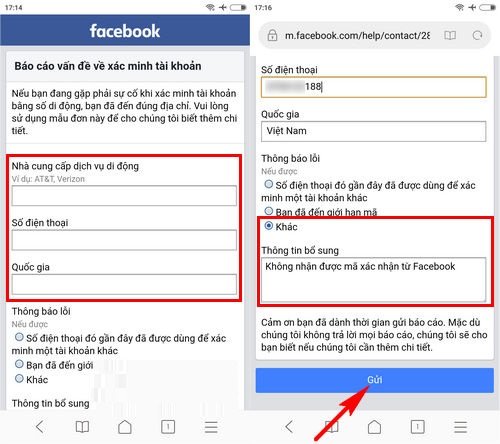
Lưu ý: với phần thông tin bổ sung bạn có thể yêu cầu như sau: Không nhận được mã xác nhận từ facebook hoặc ghi tiếng anh “I have requested confirmation code from facebook but I still have not received”
Bước 2: Nhấn “Gửi” và chờ đợi tin nhắn phản hồi từ facebook
Trên đây là những cách thức tham khảo giúp bạn khắc phục lỗi không nhận được mã gửi về từ facebook, chúc bạn thành công với một trong những cách làm trên.
THANKS FOR READINGS !
================.
English version :
Send an Error Report to Facebook
Please follow the steps below:
Step 1:
Visit Facebook’s support link: https://www.facebook.com/help/contact/283958118330524 and fill in the form.
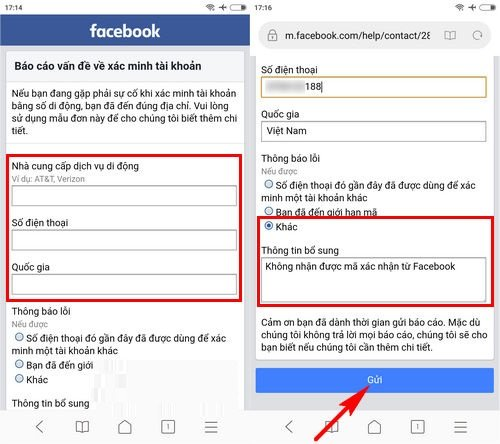
Note: In the “Additional Information” section, you can write something like: “I have requested a confirmation code from Facebook but I still have not received it.”
Step 2:
Click “Submit” and wait for a response from Facebook.
The above methods are suggestions to help you fix the issue of not receiving the verification code from Facebook. Wishing you success with one of the solutions provided.
google.com, pub-3736206267795453, DIRECT, f08c47fec0942fa0
HOẶC CÁCH KHÁC :
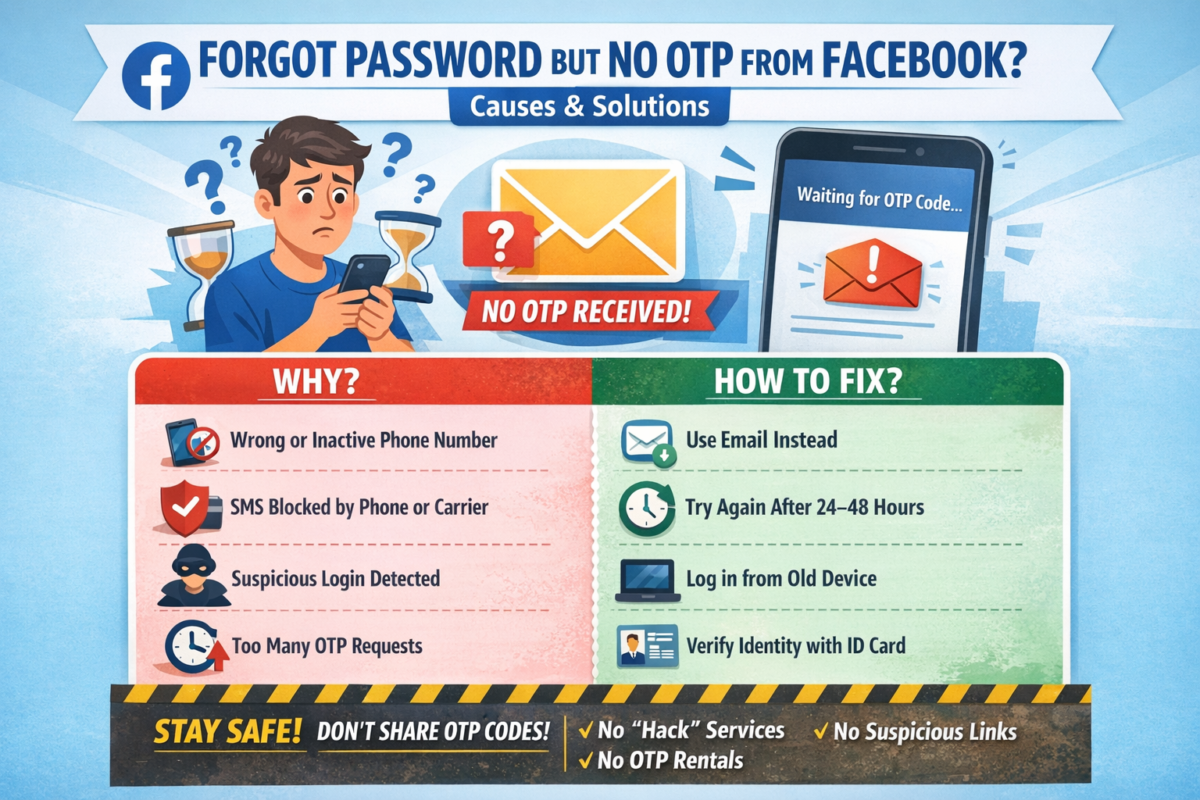
BẤM QUÊN MẬT KHẨU NHƯNG FACEBOOK KHÔNG GỬI MÃ OTP VỀ ĐIỆN THOẠI & CÁCH KHẮC PHỤC
Bạn đang cố gắng lấy lại mật khẩu Facebook, đã bấm “Quên mật khẩu” nhưng chờ mã OTP hoài không thấy gửi về điện thoại? 😥
Đây là lỗi rất nhiều người gặp phải và hoàn toàn có cách xử lý.
Bài viết này sẽ giúp bạn hiểu nguyên nhân và cách khắc phục nhanh chóng, hiệu quả.
1. Dấu hiệu Facebook không gửi mã OTP
- Không nhận được tin nhắn SMS chứa mã xác minh
- Facebook báo: “Chúng tôi đã gửi mã nhưng bạn chưa nhận được”
- Bấm gửi lại nhiều lần nhưng vẫn không có OTP
- Tài khoản bị treo ở bước xác minh
2. Nguyên nhân Facebook không gửi mã OTP về điện thoại
🔹 1. Số điện thoại đăng ký Facebook bị sai hoặc không còn sử dụng
- Đổi số điện thoại nhưng chưa cập nhật trên Facebook
- Số cũ đã hủy, mất sim
🔹 2. Điện thoại chặn tin nhắn từ Facebook
- Máy bật chặn SMS rác
- Nhà mạng chặn tin nhắn quốc tế hoặc tin nhắn tổng đài
🔹 3. Facebook nghi ngờ đăng nhập bất thường
- Đăng nhập từ thiết bị lạ
- Đăng nhập ở địa chỉ IP khác
→ Facebook tạm thời chặn gửi OTP
🔹 4. Gửi OTP quá nhiều lần trong thời gian ngắn
- Bấm “Gửi lại mã” liên tục
→ Facebook khóa tạm tính năng gửi mã
🔹 5. Lỗi hệ thống Facebook
- Facebook bị lỗi hoặc quá tải (rất hay xảy ra)
3. Cách khắc phục lỗi không nhận được mã OTP Facebook
✅ Cách 1: Kiểm tra lại sóng & tin nhắn điện thoại
- Tắt/bật chế độ máy bay
- Khởi động lại điện thoại
- Kiểm tra hộp thư Spam / Tin nhắn rác
✅ Cách 2: Đợi 24 – 48 giờ rồi thử lại
👉 KHÔNG bấm gửi mã liên tục
Sau 1–2 ngày, Facebook thường sẽ cho gửi lại OTP.
✅ Cách 3: Đăng nhập bằng email thay vì số điện thoại
Nếu tài khoản có email:
- Chọn “Quên mật khẩu”
- Chọn Xác minh qua Email
- Lấy mã trong email để đặt lại mật khẩu
✅ Cách 4: Dùng thiết bị & mạng từng đăng nhập Facebook trước đó
- Đăng nhập trên điện thoại cũ / máy tính cũ
- Dùng wifi quen thuộc
→ Tỷ lệ nhận OTP cao hơn
✅ Cách 5: Xác minh danh tính với Facebook (cách hiệu quả nhất)
Nếu không còn nhận OTP:
- Truy cập:
👉 https://www.facebook.com/help/contact/183000765122339 - Tải lên CMND/CCCD/Hộ chiếu
- Nhập email mới (chưa từng dùng cho Facebook)
- Chờ Facebook phản hồi (1–7 ngày)
4. Những lưu ý quan trọng khi lấy lại tài khoản Facebook
⚠️ Không dùng dịch vụ “hack Facebook”, “nhận OTP thuê”
⚠️ Không bấm link lạ gửi qua Messenger / SMS
⚠️ Không nhập mã OTP cho bất kỳ ai
👉 Rất dễ mất tài khoản vĩnh viễn nếu làm sai.
5. Cách tránh lỗi không nhận OTP Facebook trong tương lai
✔️ Luôn cập nhật email & số điện thoại chính xác
✔️ Bật xác thực 2 yếu tố (2FA)
✔️ Lưu sẵn mã khôi phục
✔️ Không đăng nhập Facebook trên thiết bị lạ
6. Kết luận
Việc Facebook không gửi mã OTP về điện thoại là lỗi phổ biến và hoàn toàn có thể xử lý được nếu bạn làm đúng cách.
Hãy kiên nhẫn, làm theo từng bước ở trên để lấy lại tài khoản an toàn.
Nếu bạn cần hướng dẫn chi tiết theo từng trường hợp cụ thể, hãy để lại bình luận hoặc liên hệ quản trị website để được hỗ trợ 👍
=================.
- ENGLISH VERSION :
CLICKED “FORGOT PASSWORD” BUT FACEBOOK DOESN’T SEND OTP CODE TO YOUR PHONE? CAUSES & SOLUTIONS
Have you tried to recover your Facebook password, clicked “Forgot Password”, but never received the OTP verification code on your phone? 😓
This is a very common issue, and there are effective ways to fix it.
In this article, we’ll explain why Facebook doesn’t send the OTP and how to recover your account safely.
1. Signs Facebook Is Not Sending the OTP Code
- No SMS message with the verification code
- Facebook says “We sent a code, but you haven’t received it”
- Resending the code multiple times but nothing arrives
- Account stuck at the verification step
2. Common Reasons Why Facebook Doesn’t Send OTP
🔹 1. Incorrect or inactive phone number
- Phone number was changed but not updated on Facebook
- Old SIM card is no longer active
🔹 2. Phone blocks Facebook SMS messages
- SMS spam filter enabled
- Carrier blocks international or system messages
🔹 3. Suspicious login activity detected
- Logging in from a new device or location
- Different IP address than usual
→ Facebook temporarily blocks OTP delivery
🔹 4. Too many OTP requests in a short time
- Clicking “Resend code” repeatedly
→ Facebook temporarily disables OTP sending
🔹 5. Facebook system error
- Server overload or temporary Facebook outage
3. How to Fix Facebook OTP Not Received Issue
✅ Method 1: Check your phone and network
- Turn Airplane Mode on/off
- Restart your phone
- Check Spam / Junk SMS folder
✅ Method 2: Wait 24–48 hours and try again
⚠️ Do NOT request OTP repeatedly
After 1–2 days, Facebook usually allows OTP again.
✅ Method 3: Recover account using email instead
If your account is linked to an email:
- Click Forgot Password
- Choose Verify via Email
- Use the email code to reset your password
✅ Method 4: Log in from a previously used device or network
- Use an old phone or computer
- Connect to a familiar Wi-Fi network
👉 This significantly increases OTP success rate
✅ Method 5: Verify your identity with Facebook (Most effective)
If OTP still doesn’t arrive:
- Visit:
👉 https://www.facebook.com/help/contact/183000765122339 - Upload your ID (Passport / Driver’s License / National ID)
- Enter a new email address (never used on Facebook)
- Wait for Facebook’s response (1–7 business days)
4. Important Warnings When Recovering Facebook Accounts
⚠️ Do NOT use “Facebook hacking” or “OTP rental” services
⚠️ Do NOT click suspicious links sent via SMS or Messenger
⚠️ Never share OTP codes with anyone
👉 These can permanently lock or lose your account.
5. How to Prevent Facebook OTP Issues in the Future
✔️ Keep your phone number and email updated
✔️ Enable Two-Factor Authentication (2FA)
✔️ Save backup recovery codes
✔️ Avoid logging in on unknown devices
6. Conclusion
The issue of Facebook not sending OTP codes is common but completely fixable if you follow the correct steps.
Stay patient, follow the methods above, and you can recover your Facebook account safely.
If you need step-by-step support for your specific case, feel free to contact the website administrator for assistance.
23624Đánh giá
888starz download
والله بصراحة أنا لسه بلعب هناك من حوالي ٤ شهور وقلت أنزل رأيي بدل ما حد يسأل تاني. أول حاجة لفتت نظري كمية الألعاب — عندهم آلاف العناوين، شخصيًا عديت أكتر من ٤٠٠٠ وده مش كلام دعاية لأني ضيّعت وقت كتير بأتفرج. الغالبية من Pragmatic Play وجنبها NetEnt و Play'n GO، بمعنى إن Gates of Olympus و Sweet Bonanza و Book of Dead كلهم هناك. طاولات الـlive هو المكان اللي بروحله بعد الشغل — Evolution شغالة عليه والناس اللي قدامك حقيقية مش بوتات، والستريم نضيف بشرط الإنترنت يكون مستقر. Crazy Time بقت إدمان مع إن الحظ فيها بيخون. الطاولات الكلاسيكية بتبدأ بمبالغ صغيرة كويسة. في موضوع البونصات — مكافأة التسجيل بيضاعف أول إيداع + فري سبينز على ألعاب معيّنة بس، لكن انتبه من الـwagering — ٤٠ ضعف وده مش سهل خالص. الحد الأدنى للإيداع رمزي فمفيش مخاطرة كبيرة في التجربة. للي عايز يتطلع على العروض الحالية والشروط من خلال [url=https://brasme.com.mx]تنزيل 888starz للاندرويد[/url] قبل الإيداع، لأن الأرقام بتتغير من وقت للتاني. التسجيل مش محتاج مجهود وتوثيق البيانات خلص في يوم تقريبًا. السحب طلعت مرتين خلال يوم واحد لما استخدمت Neteller، Visa و Mastercard محتاجة صبر أكتر. والكريبتو أسرع حاجة وناس كتير هنا بتفضّله لسبب واضح. الموبايل شغال معايا كويس — تنزيل 888starz للاندرويد بملف APK عادي، وده بيبقى غريب لناس أول مرة تعمله بس الملف نضيف والتطبيق أخف من المتصفح. خدمة العملاء شغالين ٢٤ ساعة وفيه عربي. مرخّص من Curacao — مش MGA يعني، ومع ذلك مفيش مشاكل حصلت معايا لحد دلوقتي. أكتر نقطة مزعجة إن الموقع فيه بانرات كتير ولازم وقت تتعوّد عليها.
888starz download
والله بصراحة أنا مسجل من حوالي ٤ شهور وحبيت أشارككم تجربتي. اللي شدّني في الأول عدد السلوتس — فيه فوق ٤٠٠٠ لعبة وده اللي شفته بعيني لأني ضيّعت وقت كتير بأتفرج. Pragmatic Play مسيطرة ومعاها NetEnt و Play'n GO، بمعنى إن Gates of Olympus و Sweet Bonanza و Book of Dead مش هتدوّر عليهم كتير. قسم الديلر المباشر ده اللي أنا قاعد عليه أغلب الوقت — كله تحت Evolution والناس اللي قدامك حقيقية مش بوتات، والصورة واضحة جدًا لو النت مش زي حالته في مصر أحيانًا. Crazy Time دي حكاية تانية بالرغم إن النتيجة عشوائية جدًا. البلاك جاك والروليت بتبدأ بمبالغ صغيرة كويسة. في موضوع البونصات — بونص الترحيب بيوصل ١٠٠٪ على أول إيداع وفيه فري سبينز معاه على ألعاب معيّنة بس، بس خد بالك من متطلب المراهنة — ٤٠ ضعف وده بيحتاج صبر. أقل إيداع بيبدأ من مبالغ بسيطة يعني تقدر تدخل بمبلغ رمزي وتشوف. لو حابب تشوف العروض الحالية والشروط من خلال [url=https://brasme.com.mx]تنزيل 888starz للاندرويد[/url] لو مهتم، بدل ما تعتمد على ذاكرتي. إنشاء الحساب أخد مني دقيقتين والتحقق من الهوية خلص في يوم تقريبًا. السحب آخر مرة سحبت بقت أقل من يوم على Skrill، Visa و Mastercard بطيئة شوية، ٣ أيام تقريبًا. والكريبتو أسرع حاجة وناس كتير هنا بتفضّله لسبب واضح. الجزء الخاص بالموبايل شغال معايا كويس — تنزيل 888starz للاندرويد مش من جوجل بلاي عشان قوانين المتجر، وده ممكن يخض حد أول مرة بس بعد التثبيت الأداء أحسن بكتير. خدمة العملاء بيردّوا على الشات في دقايق والتواصل بالعربي متاح. مرخّص من Curacao — يعني مش أقوى ترخيص في السوق، واللي عاش هناك من غير مشاكل يقول رأيه. الحاجة الوحيدة اللي بتغيظني إن القوايم متلخبطة على الشاشة الصغيرة ومحتاجة تنظيم.
????????? ??? ?? ?????? ?????? – ???? ? ???????? ???;
???? ???? ?? ?????, ?????????? ??????? ?? ?? casino ??? ??? ???????? ??? ?????? live ????????? ????? ???????????? ?????????. ?? ???????????, ?? ??????? ??????? ??? blackjack ???????????? ??????? ???????????? ????? ??? ?????, ??? ???????? ???????? ?????? ????????? ??????? ?? ??????????. ??? ???? ??????, ??? ?????????? ??? ????? ????? ????? ??? ?? ??????? ????? ?????? ???????? ???????????? ????? ????? ??? ??????? ?????????. ?????????, ??? ?? ??????? ?????? ??????????? ? ???? ??? ?? ?? ????????, ????? ??? ????? ??? [url=https://www.pinterest.com/pistolo_gr/_created/]pistolo online casino[/url], ???? ??????? ?????? ????? ??? ?????? ??? bankroll. ????? ?? ???????? ????? ??? ??? ???? ?????????; ????? ??????? ????? ???? ???????? ?????? ??? ?? ??????? ?? bankroll; ???????? ??? ??????? ???, ?????? ? ???? ????? ??????. ???? ????? ??????! http://www.my-idea.net/cgi-bin/mn_forum.cgi?file=0 ???????? ??? ?? ????????? ???? ??? ????? - ???? ? ???????? ???; http://badabizline.com/bbs/board.php?bo_table=notice&wr_id=596680 ??? ????? ????? ?? http://signup-be-hub.pantheonsite.io/topic/19048/ ??????? ??????? ?? ?? ???????? ???? ??? ????? - ???? ? ???????? ???; http://park1.wakwak.com/araki/cgi-bin/yybbs/yybbs.cgi?list=thread ??? ??????? ????? ??????? ?? ?? ???????? ???? ??? ????? - ?? ?????????; https://revesdechasse.com/photo/resultat-de-notre-soiree?page=8278#comment-2447825 ??? ?????????? ????? ??? ?? ????????? ???? ??? ????? - ???? ? ????? ???; e3907ed
дизайнерская мебель диваны
Откройте для себя комфорт и стиль с [url=https://www.divany-premium-klassa.ru/]диваны премиум класса купить в москве[/url] — идеальный выбор для тех, кто ценит эксклюзивность и безупречное качество. Дизайнерские модели успешно объединяют визуальную привлекательность и удобство. Модели с углом удобны для семейного отдыха и рационального использования площади. Натуральная кожа выглядит роскошно и служит долго при правильном уходе. Тестировать мягкую мебель стоит лично и оценивать ощущение при сидении и лежании.
Заказать t524c
Боюсь, что я не знаю. Заказать дизайн интерьеров, [url=https://dking.studio/doma-i-kottedzhi.html]купить дизайн студии[/url] превращается легко. Квалифицированные дизайнеры представят уникальные решения для вашего пространства. Фокусируется на индивидуальные предпочтения.
! r89p
А СЕРВЕР НЕ ПАШЕТ НА...... Las Vegas, a vibrant city known for its dazzling lights, offers countless entertainment options. Among these, vegasnow casino, [url=https://vegas-now-casinos-aus.com/]vegas-now-casinos-aus.com[/url] stands out for its exciting games including exceptional services. Visitors love the thrill of winning big as they immersing themselves in a dynamic atmosphere.
888starz apk
يا جماعة بصراحة أنا ليا تقريباً أربع شهور بجرب على المنصة دي ومش هينفع أقول إنها كاملة الأوصاف، لكن الواقع إن تجربتي أحسن من كتير حاجات جربتها قبل كده. أصلي من الإسكندرية والمشكلة الأكبر عندنا كمصريين هي السحب والإيداع، وعشان كده كان أهم حاجة اختبرتها. أول لعبة فتحتها كانت Gates of Olympus بتاعة براجماتيك، وبعدها جربت Sweet Bonanza وكمان Book of Dead بتاعة بلاي إن جو. مكتبة الألعاب ضخمة فعلاً — عندهم فوق الـ ٧٥٠٠ سلوت ما بين NetEnt و Microgaming و Yggdrasil و Betsoft. النقطة الحلوة إن بيبقى تنوع حقيقي مش نفس اللعبة بألف شكل. الطاولات المباشرة اللي شغالة بـ Evolution بيبقى المكان اللي بضيع فيه فلوسي بصراحة. الروليت وبلاك جاك والكروبيهات بني آدمين فعلاً والبث واضحة حتى على نت الموبايل. Crazy Time تحديداً إدمان بجد — كسبت فيها مرة واحدة مبلغ حلو وبعد كده ضيعتها تاني، عادي يعني. في موضوع العروض: بونص التسجيل عندهم مضاعفة أول إيداع بالإضافة لـ لفات مجانية والحد الأدنى للإيداع بسيط جداً — حاجة زي دولار. بس ركز في شروط المراهنة علشان بتكون ٤٠ مرة واللي بياخد وقت. تقدر تشوف الشروط المحدثة على [url=https://bestmoneygoldap.com]888starz تحميل[/url] قبل ما تحط فلوس. فتح الحساب مخدتش تلات دقايق بالتوثيق. فلوسي في أول عملية استغرق يومين بسبب التحقق من الهوية، واللي ضايقني شوية لكن بعدها أصبح أسرع بكتير. بحول الكريبتو دلوقتي لأنه أسرع حاجة، رغم إن الفيزا والمحافظ الإلكترونية متاحين برضه. التطبيق على الأندرويد مش تقيل و تنزيله مباشر من موقعهم مش من متجر جوجل — نقطة المفروض تنتبه لها. الدعم الفني فيه شات بالعربي لكن أحياناً بياخد وقت وقت الذروة. الترخيص من كوراساو، وده معناه مش MGA بس الموقع صامد من ٢٠١٢ ومحدش اشتكى.
888starz apk
يا جماعة بصراحة أنا ليا حوالي خمس شهور بلعب هنا ومش هينفع أقول إنها مثالية، لكن الحقيقة إن اللي شفته أحسن من كتير حاجات جربتها قبل كده. أنا من الإسكندرية والمشكلة الأكبر عندنا في مصر بتبقى طرق الدفع، وعشان كده كان أهم حاجة جربتها. اللعبة اللي بدأت بيها كانت Gates of Olympus بتاعة براجماتيك، ووبعد كده جربت Sweet Bonanza ووطبعاً Book of Dead بتاعة بلاي إن جو. الكتالوج كبيرة جداً فعلاً — عندهم أكتر من ٧٠٠٠ سلوت ما بين NetEnt و Microgaming و Yggdrasil و Betsoft. اللي عجبني إن بيبقى اختلاف واضح مش نفس اللعبة متكررة. الطاولات المباشرة اللي شغالة بـ Evolution بيبقى اللي بقضي فيه وقت أكتر. الروليت وبلاك جاك والموزعين حقيقيين والبث واضحة حتى على نت الموبايل. Crazy Time بالذات حاجة تخض والله — كسبت فيها مرة واحدة مبلغ حلو وبعد كده رجعتها كلها، عادي يعني. بخصوص البونص: الترحيبي عندهم ١٠٠٪ على أول إيداع مع فري سبينز والحد الأدنى للإيداع بسيط جداً — دولار أو اتنين. لكن خلي بالك من الـ wagering علشان بتكون x40 واللي بياخد وقت. شوف الشروط المحدثة على [url=https://bestmoneygoldap.com]888starz تحميل[/url] قبل ما تسجل. فتح الحساب أخدت مني تلات دقايق بالتوثيق. فلوسي في أول عملية استغرق يومين عشان الـ KYC، واللي كان مزعج لكن بعدها بقى أسرع بكتير. بستخدم USDT حالياً علشان بيوصل في دقايق، مع إن الفيزا والمحافظ الإلكترونية متاحين كمان. التطبيق على الأندرويد مش تقيل و تنزيله مباشر من موقعهم مش من متجر جوجل — نقطة لازم تعرفها. الدعم الفني فيه شات بالعربي بس ساعات بيبطأ وقت الذروة. الترخيص من كوراساو، وده معناه مش أوروبي لكن المنصة صامد من سنين ومحدش اشتكى.
онлайн h225e
Обычно с пол года требуется
! v836v
1win casino, [url=https://1win-vcy566.sbs/]https://1win-vcy566.sbs/[/url] предлагает множество игр, среди которых слоты, карточные игры и казино-игры. Все игрок найдет нечто для себя. Удобный интерфейс и многочисленные бонусы делают 1win casino привлекательным выбором для азартных игроков.