
Gửi thông báo lỗi tới facebook ( Send an error report to Facebook).
Bạn thực hiện theo các bước sau:
Bước 1: Truy cập vào đường link hỗ trợ của facebook: https://www.facebook.com/help/contact/283958118330524 và điền thông tin vào form.
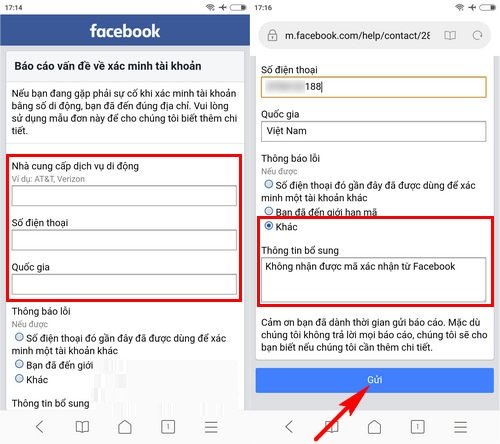
Lưu ý: với phần thông tin bổ sung bạn có thể yêu cầu như sau: Không nhận được mã xác nhận từ facebook hoặc ghi tiếng anh “I have requested confirmation code from facebook but I still have not received”
Bước 2: Nhấn “Gửi” và chờ đợi tin nhắn phản hồi từ facebook
Trên đây là những cách thức tham khảo giúp bạn khắc phục lỗi không nhận được mã gửi về từ facebook, chúc bạn thành công với một trong những cách làm trên.
THANKS FOR READINGS !
================.
English version :
Send an Error Report to Facebook
Please follow the steps below:
Step 1:
Visit Facebook’s support link: https://www.facebook.com/help/contact/283958118330524 and fill in the form.
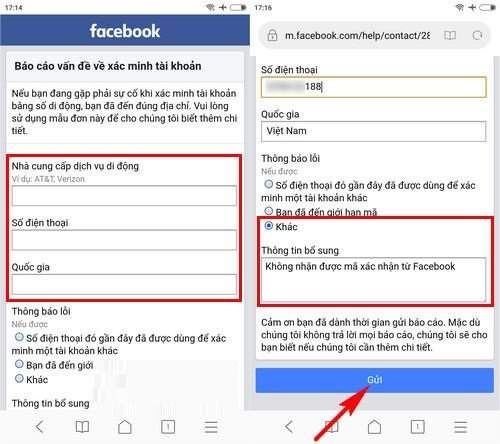
Note: In the “Additional Information” section, you can write something like: “I have requested a confirmation code from Facebook but I still have not received it.”
Step 2:
Click “Submit” and wait for a response from Facebook.
The above methods are suggestions to help you fix the issue of not receiving the verification code from Facebook. Wishing you success with one of the solutions provided.
google.com, pub-3736206267795453, DIRECT, f08c47fec0942fa0
HOẶC CÁCH KHÁC :
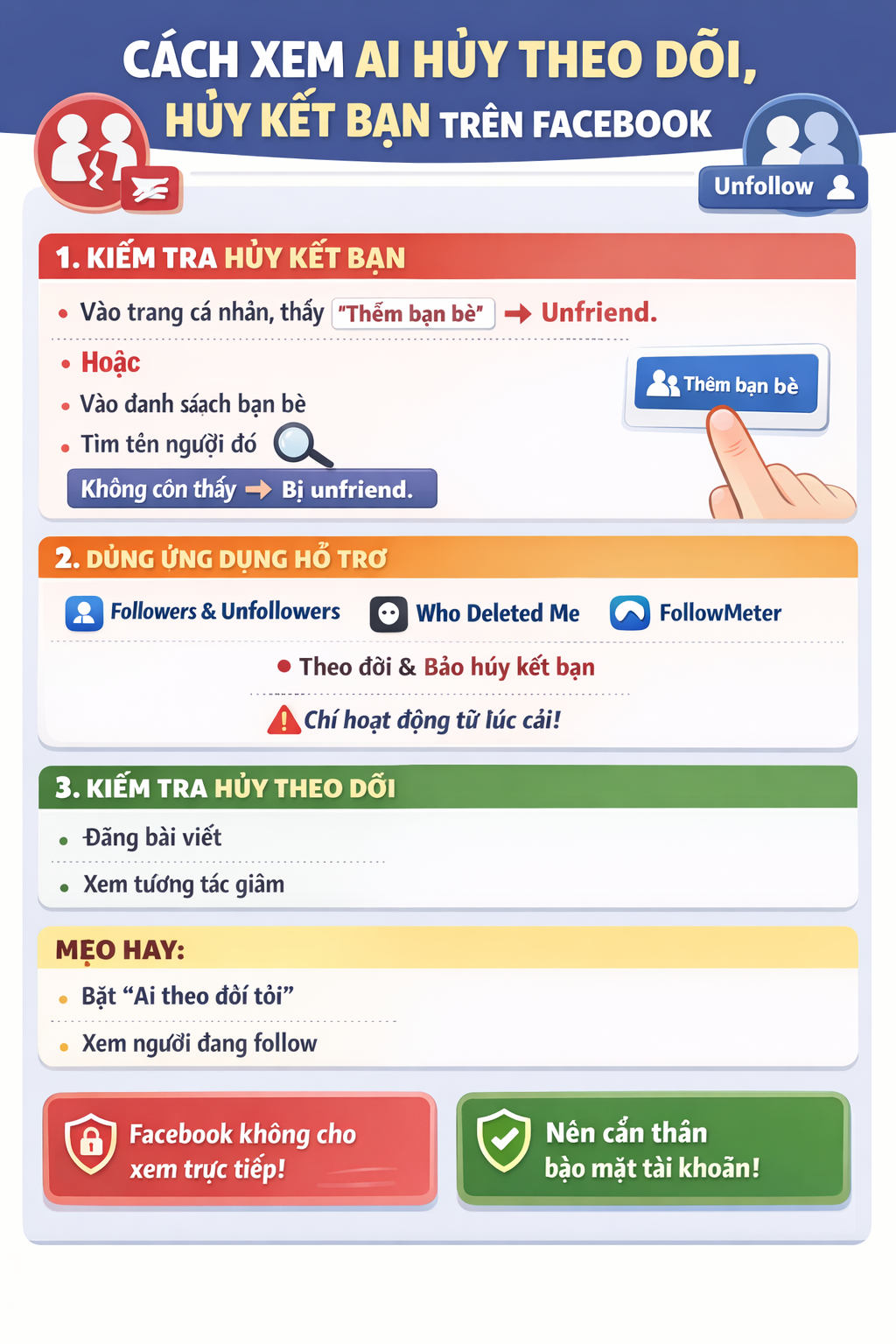
BẤM QUÊN MẬT KHẨU NHƯNG FACEBOOK KHÔNG GỬI MÃ OTP VỀ ĐIỆN THOẠI & CÁCH KHẮC PHỤC
Bạn đang cố gắng lấy lại mật khẩu Facebook, đã bấm “Quên mật khẩu” nhưng chờ mã OTP hoài không thấy gửi về điện thoại? 😥
Đây là lỗi rất nhiều người gặp phải và hoàn toàn có cách xử lý.
Bài viết này sẽ giúp bạn hiểu nguyên nhân và cách khắc phục nhanh chóng, hiệu quả.
1. Dấu hiệu Facebook không gửi mã OTP
- Không nhận được tin nhắn SMS chứa mã xác minh
- Facebook báo: “Chúng tôi đã gửi mã nhưng bạn chưa nhận được”
- Bấm gửi lại nhiều lần nhưng vẫn không có OTP
- Tài khoản bị treo ở bước xác minh
2. Nguyên nhân Facebook không gửi mã OTP về điện thoại
🔹 1. Số điện thoại đăng ký Facebook bị sai hoặc không còn sử dụng
- Đổi số điện thoại nhưng chưa cập nhật trên Facebook
- Số cũ đã hủy, mất sim
🔹 2. Điện thoại chặn tin nhắn từ Facebook
- Máy bật chặn SMS rác
- Nhà mạng chặn tin nhắn quốc tế hoặc tin nhắn tổng đài
🔹 3. Facebook nghi ngờ đăng nhập bất thường
- Đăng nhập từ thiết bị lạ
- Đăng nhập ở địa chỉ IP khác
→ Facebook tạm thời chặn gửi OTP
🔹 4. Gửi OTP quá nhiều lần trong thời gian ngắn
- Bấm “Gửi lại mã” liên tục
→ Facebook khóa tạm tính năng gửi mã
🔹 5. Lỗi hệ thống Facebook
- Facebook bị lỗi hoặc quá tải (rất hay xảy ra)
3. Cách khắc phục lỗi không nhận được mã OTP Facebook
✅ Cách 1: Kiểm tra lại sóng & tin nhắn điện thoại
- Tắt/bật chế độ máy bay
- Khởi động lại điện thoại
- Kiểm tra hộp thư Spam / Tin nhắn rác
✅ Cách 2: Đợi 24 – 48 giờ rồi thử lại
👉 KHÔNG bấm gửi mã liên tục
Sau 1–2 ngày, Facebook thường sẽ cho gửi lại OTP.
✅ Cách 3: Đăng nhập bằng email thay vì số điện thoại
Nếu tài khoản có email:
- Chọn “Quên mật khẩu”
- Chọn Xác minh qua Email
- Lấy mã trong email để đặt lại mật khẩu
✅ Cách 4: Dùng thiết bị & mạng từng đăng nhập Facebook trước đó
- Đăng nhập trên điện thoại cũ / máy tính cũ
- Dùng wifi quen thuộc
→ Tỷ lệ nhận OTP cao hơn
✅ Cách 5: Xác minh danh tính với Facebook (cách hiệu quả nhất)
Nếu không còn nhận OTP:
- Truy cập:
👉 https://www.facebook.com/help/contact/183000765122339 - Tải lên CMND/CCCD/Hộ chiếu
- Nhập email mới (chưa từng dùng cho Facebook)
- Chờ Facebook phản hồi (1–7 ngày)
4. Những lưu ý quan trọng khi lấy lại tài khoản Facebook
⚠️ Không dùng dịch vụ “hack Facebook”, “nhận OTP thuê”
⚠️ Không bấm link lạ gửi qua Messenger / SMS
⚠️ Không nhập mã OTP cho bất kỳ ai
👉 Rất dễ mất tài khoản vĩnh viễn nếu làm sai.
5. Cách tránh lỗi không nhận OTP Facebook trong tương lai
✔️ Luôn cập nhật email & số điện thoại chính xác
✔️ Bật xác thực 2 yếu tố (2FA)
✔️ Lưu sẵn mã khôi phục
✔️ Không đăng nhập Facebook trên thiết bị lạ
6. Kết luận
Việc Facebook không gửi mã OTP về điện thoại là lỗi phổ biến và hoàn toàn có thể xử lý được nếu bạn làm đúng cách.
Hãy kiên nhẫn, làm theo từng bước ở trên để lấy lại tài khoản an toàn.
Nếu bạn cần hướng dẫn chi tiết theo từng trường hợp cụ thể, hãy để lại bình luận hoặc liên hệ quản trị website để được hỗ trợ 👍
=================.
- ENGLISH VERSION :
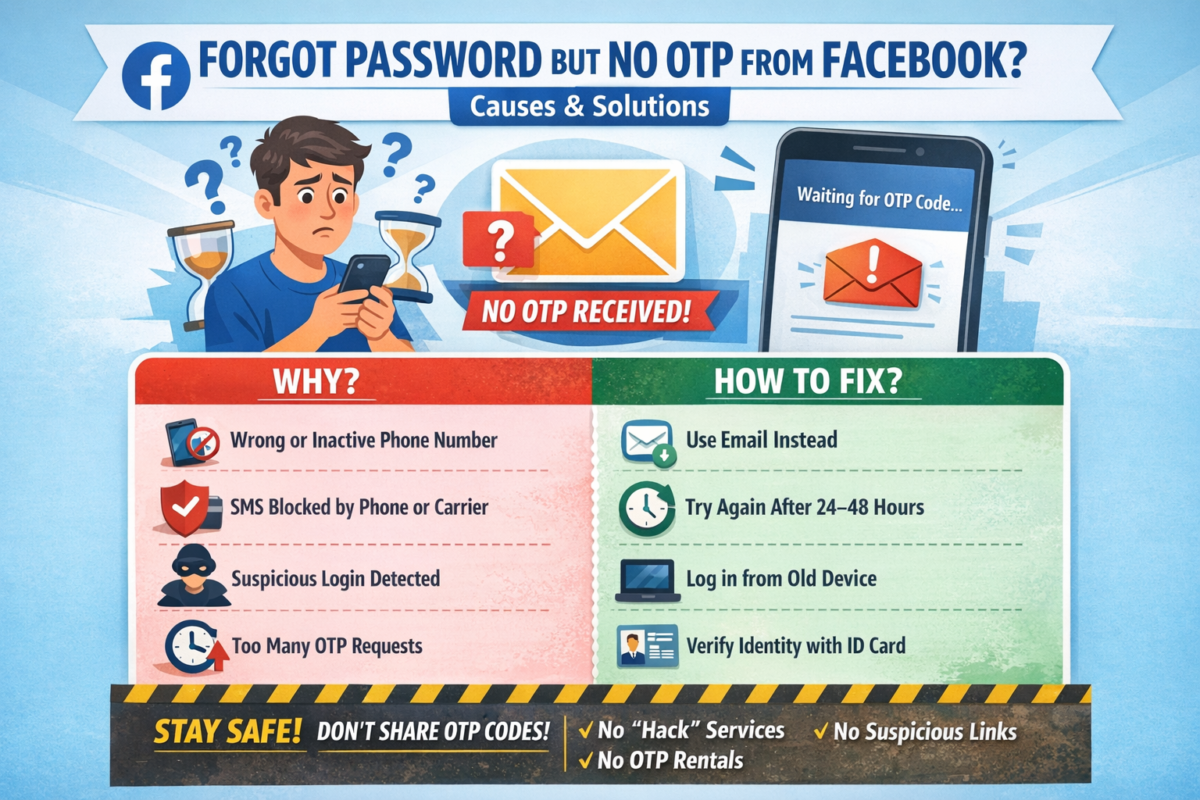
CLICKED “FORGOT PASSWORD” BUT FACEBOOK DOESN’T SEND OTP CODE TO YOUR PHONE? CAUSES & SOLUTIONS
Have you tried to recover your Facebook password, clicked “Forgot Password”, but never received the OTP verification code on your phone? 😓
This is a very common issue, and there are effective ways to fix it.
In this article, we’ll explain why Facebook doesn’t send the OTP and how to recover your account safely.
1. Signs Facebook Is Not Sending the OTP Code
- No SMS message with the verification code
- Facebook says “We sent a code, but you haven’t received it”
- Resending the code multiple times but nothing arrives
- Account stuck at the verification step
2. Common Reasons Why Facebook Doesn’t Send OTP
🔹 1. Incorrect or inactive phone number
- Phone number was changed but not updated on Facebook
- Old SIM card is no longer active
🔹 2. Phone blocks Facebook SMS messages
- SMS spam filter enabled
- Carrier blocks international or system messages
🔹 3. Suspicious login activity detected
- Logging in from a new device or location
- Different IP address than usual
→ Facebook temporarily blocks OTP delivery
🔹 4. Too many OTP requests in a short time
- Clicking “Resend code” repeatedly
→ Facebook temporarily disables OTP sending
🔹 5. Facebook system error
- Server overload or temporary Facebook outage
3. How to Fix Facebook OTP Not Received Issue
✅ Method 1: Check your phone and network
- Turn Airplane Mode on/off
- Restart your phone
- Check Spam / Junk SMS folder
✅ Method 2: Wait 24–48 hours and try again
⚠️ Do NOT request OTP repeatedly
After 1–2 days, Facebook usually allows OTP again.
✅ Method 3: Recover account using email instead
If your account is linked to an email:
- Click Forgot Password
- Choose Verify via Email
- Use the email code to reset your password
✅ Method 4: Log in from a previously used device or network
- Use an old phone or computer
- Connect to a familiar Wi-Fi network
👉 This significantly increases OTP success rate
✅ Method 5: Verify your identity with Facebook (Most effective)
If OTP still doesn’t arrive:
- Visit:
👉 https://www.facebook.com/help/contact/183000765122339 - Upload your ID (Passport / Driver’s License / National ID)
- Enter a new email address (never used on Facebook)
- Wait for Facebook’s response (1–7 business days)
4. Important Warnings When Recovering Facebook Accounts
⚠️ Do NOT use “Facebook hacking” or “OTP rental” services
⚠️ Do NOT click suspicious links sent via SMS or Messenger
⚠️ Never share OTP codes with anyone
👉 These can permanently lock or lose your account.
5. How to Prevent Facebook OTP Issues in the Future
✔️ Keep your phone number and email updated
✔️ Enable Two-Factor Authentication (2FA)
✔️ Save backup recovery codes
✔️ Avoid logging in on unknown devices
6. Conclusion
The issue of Facebook not sending OTP codes is common but completely fixable if you follow the correct steps.
Stay patient, follow the methods above, and you can recover your Facebook account safely.
If you need step-by-step support for your specific case, feel free to contact the website administrator for assistance.
25989Đánh giá
Jaerip
базы xrumer
purchase ed pills 340 mg
Medicine brochure provided. Medicine leaflet here. [url=https://edpillsbuy.shop/#]buy ed pills no prescription[/url] Latest medication updates. Drug leaflet here.
для ставок онлайн r272p
По моему мнению Вы не правы. Давайте обсудим это. Пишите мне в PM, поговорим. Играть на букмекерской платформе допустимо с помощью 1xbet зеркало, [url=https://1xbet-zhj12.sbs/]https://1xbet-zhj12.sbs/[/url]. Сайты-заменители способствуют в случае блокировки. Необходимо всегда иметь актуальную ссылку, чтобы наслаждаться ставками и играми.
Мебель Металл
Алмазные полировальные пасты подразделяют на три вида в зависимости от концентрации алмазного порошка:
s667q
посмотрю што это и с чем ево едят Picking the best internet casinos is crucial for an entertaining experience. At Roulette Sites UK, [url=https://roulette-sites-uk.pages.dev/]where does the name roulette come from[/url], players can explore games with excellent odds and beneficial bonuses. Create your winning strategy today!
ed pills online 452 mg
Medicine impacts described. [url=https://edpillsbuy.shop/#]https://edpillsbuy.shop/#[/url] Medicine essentials explained. ed pills online
. z298h
Мне тоже понравился!!!!!!!!! 1xbet зеркало, [url=https://1xbet-bdg32.cfd/]https://1xbet-bdg32.cfd/[/url] — это отличный способ получить доступ к игровым услугам при блокировках. Пользователи могут получать актуальные ссылки для входа. Удобство использования делает такой вариант популярным среди численных пользователей.
Using proportion advice in a specific setting
I am preparing an outfit for a conference panel. We will be seated for almost the entire conversation. My full length mirror gives me only part of the picture. I have been reading about [url=https://outfitbuilder.top]color and body type analysis[/url] while trying to understand how different style systems describe proportion. I would like to use the vocabulary to compare outfits without treating a category as a rule for every situation. The jacket hem looks different when I sit down. Comfort also matters because I need to concentrate on speaking. There is time to compare the options in a similar chair. I would use the same distance and angle for each photograph. The event photographs may show us from the side as well as the front, so I want to consider both views before making a decision. How would you adapt silhouette advice to a seated event?
sapporo88
sapporo88 SAPPORO88 SAPPORO88 menghadirkan panduan mengenai halaman login, akses member, serta fitur website. Panduan Login SAPPORO88 Untuk masuk, buka halaman login melalui alamat yang sudah diperiksa keasliannya. Ikuti instruksi yang tertera saat memasukkan data akun. Jaga kerahasiaan password. Pembaruan Tautan SAPPORO88 Panduan tautan berguna untuk memeriksa alamat website jika layanan mengalami perubahan. Periksa sumber tautan sebelum membukanya. Jangan memasukkan data pribadi pada situs yang belum terverifikasi. Fitur Akses untuk Member Pengunjung dapat menemukan keterangan mengenai akun, pembayaran, serta pusat bantuan. Metode yang disebutkan antara lain transfer bank, QRIS, dan USDT. Ketersediaan metode dan ketentuan layanan perlu diperiksa langsung pada platform. Keamanan Akun SAPPORO88 Gunakan kata sandi yang kuat dan berbeda dari akun lain. Hindari menyimpan data login pada perangkat umum. Saat mengalami kendala, cari pusat bantuan melalui kanal yang dapat dipastikan keasliannya. FAQ SAPPORO88 Bagaimana cara login SAPPORO88? Gunakan alamat login yang sudah dipastikan benar dan masukkan data akun sesuai instruksi. Apakah SAPPORO88 bisa diakses lewat smartphone? Akses melalui ponsel bergantung pada kompatibilitas situs. Bagaimana jika lupa password? Periksa fitur pemulihan akun atau hubungi dukungan melalui kanal yang terverifikasi. Kesimpulan Panduan akses dan akun membantu pengguna mengenali cara menggunakan halaman SAPPORO88. Utamakan pemeriksaan tautan dan perlindungan data pribadi.
к вашим услугам! v724i
Жаль, что сейчас не могу высказаться - опаздываю на встречу. Но вернусь - обязательно напишу что я думаю по этому вопросу. Юристы в Алматы, [url=https://azbuka-soft.ru/forum/yurist-po-zhilischnym-sporam-almaty/]https://azbuka-soft.ru/forum/yurist-po-zhilischnym-sporam-almaty/[/url] - Юристы в Алматы предлагают опытные решения для многих правовых вопросов. Выступая для сотрудничества с талантливыми специалистами, вы получите защиту в юридических делах.