
Gửi thông báo lỗi tới facebook ( Send an error report to Facebook).
Bạn thực hiện theo các bước sau:
Bước 1: Truy cập vào đường link hỗ trợ của facebook: https://www.facebook.com/help/contact/283958118330524 và điền thông tin vào form.
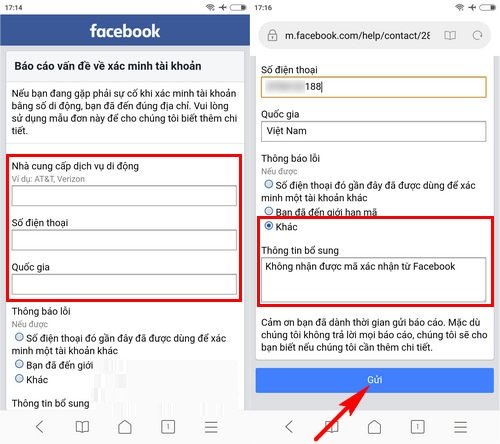
Lưu ý: với phần thông tin bổ sung bạn có thể yêu cầu như sau: Không nhận được mã xác nhận từ facebook hoặc ghi tiếng anh “I have requested confirmation code from facebook but I still have not received”
Bước 2: Nhấn “Gửi” và chờ đợi tin nhắn phản hồi từ facebook
Trên đây là những cách thức tham khảo giúp bạn khắc phục lỗi không nhận được mã gửi về từ facebook, chúc bạn thành công với một trong những cách làm trên.
THANKS FOR READINGS !
================.
English version :
Send an Error Report to Facebook
Please follow the steps below:
Step 1:
Visit Facebook’s support link: https://www.facebook.com/help/contact/283958118330524 and fill in the form.
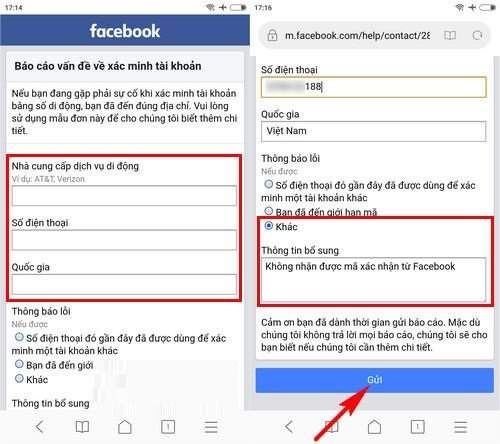
Note: In the “Additional Information” section, you can write something like: “I have requested a confirmation code from Facebook but I still have not received it.”
Step 2:
Click “Submit” and wait for a response from Facebook.
The above methods are suggestions to help you fix the issue of not receiving the verification code from Facebook. Wishing you success with one of the solutions provided.
google.com, pub-3736206267795453, DIRECT, f08c47fec0942fa0
HOẶC CÁCH KHÁC :
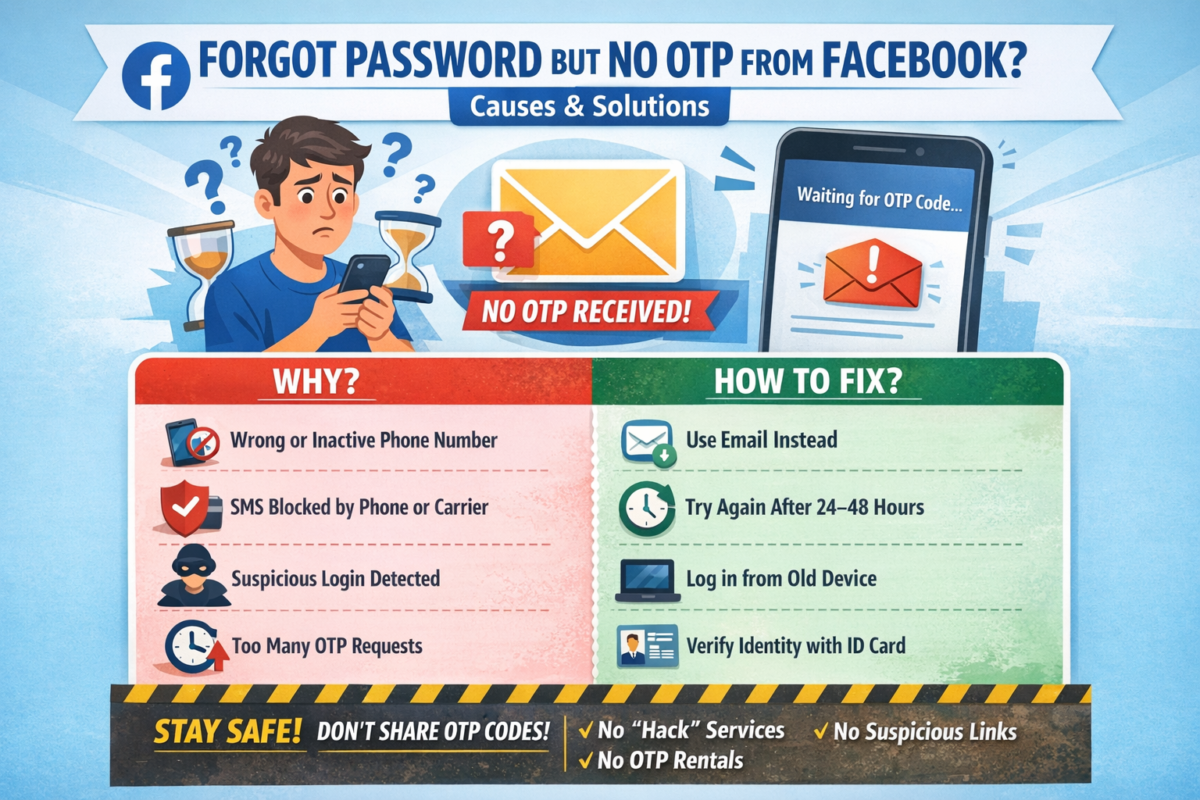
BẤM QUÊN MẬT KHẨU NHƯNG FACEBOOK KHÔNG GỬI MÃ OTP VỀ ĐIỆN THOẠI & CÁCH KHẮC PHỤC
Bạn đang cố gắng lấy lại mật khẩu Facebook, đã bấm “Quên mật khẩu” nhưng chờ mã OTP hoài không thấy gửi về điện thoại? 😥
Đây là lỗi rất nhiều người gặp phải và hoàn toàn có cách xử lý.
Bài viết này sẽ giúp bạn hiểu nguyên nhân và cách khắc phục nhanh chóng, hiệu quả.
1. Dấu hiệu Facebook không gửi mã OTP
- Không nhận được tin nhắn SMS chứa mã xác minh
- Facebook báo: “Chúng tôi đã gửi mã nhưng bạn chưa nhận được”
- Bấm gửi lại nhiều lần nhưng vẫn không có OTP
- Tài khoản bị treo ở bước xác minh
2. Nguyên nhân Facebook không gửi mã OTP về điện thoại
🔹 1. Số điện thoại đăng ký Facebook bị sai hoặc không còn sử dụng
- Đổi số điện thoại nhưng chưa cập nhật trên Facebook
- Số cũ đã hủy, mất sim
🔹 2. Điện thoại chặn tin nhắn từ Facebook
- Máy bật chặn SMS rác
- Nhà mạng chặn tin nhắn quốc tế hoặc tin nhắn tổng đài
🔹 3. Facebook nghi ngờ đăng nhập bất thường
- Đăng nhập từ thiết bị lạ
- Đăng nhập ở địa chỉ IP khác
→ Facebook tạm thời chặn gửi OTP
🔹 4. Gửi OTP quá nhiều lần trong thời gian ngắn
- Bấm “Gửi lại mã” liên tục
→ Facebook khóa tạm tính năng gửi mã
🔹 5. Lỗi hệ thống Facebook
- Facebook bị lỗi hoặc quá tải (rất hay xảy ra)
3. Cách khắc phục lỗi không nhận được mã OTP Facebook
✅ Cách 1: Kiểm tra lại sóng & tin nhắn điện thoại
- Tắt/bật chế độ máy bay
- Khởi động lại điện thoại
- Kiểm tra hộp thư Spam / Tin nhắn rác
✅ Cách 2: Đợi 24 – 48 giờ rồi thử lại
👉 KHÔNG bấm gửi mã liên tục
Sau 1–2 ngày, Facebook thường sẽ cho gửi lại OTP.
✅ Cách 3: Đăng nhập bằng email thay vì số điện thoại
Nếu tài khoản có email:
- Chọn “Quên mật khẩu”
- Chọn Xác minh qua Email
- Lấy mã trong email để đặt lại mật khẩu
✅ Cách 4: Dùng thiết bị & mạng từng đăng nhập Facebook trước đó
- Đăng nhập trên điện thoại cũ / máy tính cũ
- Dùng wifi quen thuộc
→ Tỷ lệ nhận OTP cao hơn
✅ Cách 5: Xác minh danh tính với Facebook (cách hiệu quả nhất)
Nếu không còn nhận OTP:
- Truy cập:
👉 https://www.facebook.com/help/contact/183000765122339 - Tải lên CMND/CCCD/Hộ chiếu
- Nhập email mới (chưa từng dùng cho Facebook)
- Chờ Facebook phản hồi (1–7 ngày)
4. Những lưu ý quan trọng khi lấy lại tài khoản Facebook
⚠️ Không dùng dịch vụ “hack Facebook”, “nhận OTP thuê”
⚠️ Không bấm link lạ gửi qua Messenger / SMS
⚠️ Không nhập mã OTP cho bất kỳ ai
👉 Rất dễ mất tài khoản vĩnh viễn nếu làm sai.
5. Cách tránh lỗi không nhận OTP Facebook trong tương lai
✔️ Luôn cập nhật email & số điện thoại chính xác
✔️ Bật xác thực 2 yếu tố (2FA)
✔️ Lưu sẵn mã khôi phục
✔️ Không đăng nhập Facebook trên thiết bị lạ
6. Kết luận
Việc Facebook không gửi mã OTP về điện thoại là lỗi phổ biến và hoàn toàn có thể xử lý được nếu bạn làm đúng cách.
Hãy kiên nhẫn, làm theo từng bước ở trên để lấy lại tài khoản an toàn.
Nếu bạn cần hướng dẫn chi tiết theo từng trường hợp cụ thể, hãy để lại bình luận hoặc liên hệ quản trị website để được hỗ trợ 👍
=================.
- ENGLISH VERSION :
CLICKED “FORGOT PASSWORD” BUT FACEBOOK DOESN’T SEND OTP CODE TO YOUR PHONE? CAUSES & SOLUTIONS
Have you tried to recover your Facebook password, clicked “Forgot Password”, but never received the OTP verification code on your phone? 😓
This is a very common issue, and there are effective ways to fix it.
In this article, we’ll explain why Facebook doesn’t send the OTP and how to recover your account safely.
1. Signs Facebook Is Not Sending the OTP Code
- No SMS message with the verification code
- Facebook says “We sent a code, but you haven’t received it”
- Resending the code multiple times but nothing arrives
- Account stuck at the verification step
2. Common Reasons Why Facebook Doesn’t Send OTP
🔹 1. Incorrect or inactive phone number
- Phone number was changed but not updated on Facebook
- Old SIM card is no longer active
🔹 2. Phone blocks Facebook SMS messages
- SMS spam filter enabled
- Carrier blocks international or system messages
🔹 3. Suspicious login activity detected
- Logging in from a new device or location
- Different IP address than usual
→ Facebook temporarily blocks OTP delivery
🔹 4. Too many OTP requests in a short time
- Clicking “Resend code” repeatedly
→ Facebook temporarily disables OTP sending
🔹 5. Facebook system error
- Server overload or temporary Facebook outage
3. How to Fix Facebook OTP Not Received Issue
✅ Method 1: Check your phone and network
- Turn Airplane Mode on/off
- Restart your phone
- Check Spam / Junk SMS folder
✅ Method 2: Wait 24–48 hours and try again
⚠️ Do NOT request OTP repeatedly
After 1–2 days, Facebook usually allows OTP again.
✅ Method 3: Recover account using email instead
If your account is linked to an email:
- Click Forgot Password
- Choose Verify via Email
- Use the email code to reset your password
✅ Method 4: Log in from a previously used device or network
- Use an old phone or computer
- Connect to a familiar Wi-Fi network
👉 This significantly increases OTP success rate
✅ Method 5: Verify your identity with Facebook (Most effective)
If OTP still doesn’t arrive:
- Visit:
👉 https://www.facebook.com/help/contact/183000765122339 - Upload your ID (Passport / Driver’s License / National ID)
- Enter a new email address (never used on Facebook)
- Wait for Facebook’s response (1–7 business days)
4. Important Warnings When Recovering Facebook Accounts
⚠️ Do NOT use “Facebook hacking” or “OTP rental” services
⚠️ Do NOT click suspicious links sent via SMS or Messenger
⚠️ Never share OTP codes with anyone
👉 These can permanently lock or lose your account.
5. How to Prevent Facebook OTP Issues in the Future
✔️ Keep your phone number and email updated
✔️ Enable Two-Factor Authentication (2FA)
✔️ Save backup recovery codes
✔️ Avoid logging in on unknown devices
6. Conclusion
The issue of Facebook not sending OTP codes is common but completely fixable if you follow the correct steps.
Stay patient, follow the methods above, and you can recover your Facebook account safely.
If you need step-by-step support for your specific case, feel free to contact the website administrator for assistance.
25716Đánh giá
Comparing clothes before buying more
With more presentations taking place online, I have begun paying attention to the tops I wear during work calls. A shirt that looks balanced in the mirror can seem distracting on screen, particularly beside the pale wall behind me. The goal is not a formal appearance for every meeting, but clothing that does not compete with my face. Keeping the room setup unchanged should let me compare several solid-colored tops without confusing clothing differences with lighting changes. I found a page about [url=https://outfit-style.top]color analysis[/url] and would like to use the idea as a starting point for these comparisons. Fine patterns seem busy on screen, so I am concentrating on solid colors before deciding anything about new purchases. Is a brief recording a better comparison than watching the live preview, especially when deciding between similar shirt colors? I cannot decide how much weight to give the background when a shirt seems reasonably flattering around my face. If you present online regularly, I would appreciate the checks you use before settling on your usual camera clothes.
Цифровое здравоохранение
Подруга детства на приёме в частной клинике. В один голос говорят. ЕГИСЗ — автоматически попадают в единую базу. Телемедицина закрыть больничный — а без передачи — штрафы. Советую глянуть источник: смп егисз [url=https://carshopr.ru]смп егисз[/url] И про техническую поддержку ЕГИСЗ для частных медцентров. Чем раньше начнёшь разбираться.
продвижение сайтов
Продвижение сайта требует грамотного подхода, и здесь на помощь приходят профессиональные интернет-агентства. Они предлагают широкий спектр услуг для SEO продвижения. В Москве хорошо зарекомендовали себя агентства Net SEO и SEO Partners. Их специалисты работают с оптимизацией и SEO продвижением сайтов, помогая бизнесу расти в интернете. Если вы хотите узнать больше, советую поискать по запросу продвижение сайта реклама [url=https://prodvizhenie-sajtov-v-moskve18.ru]https://prodvizhenie-sajtov-v-moskve18.ru[/url] — там найдёте много полезной информации и отзывы. Сравните цены и услуги, чтобы найти оптимальное решение. Пусть ваш сайт выйдет в топы благодаря грамотному продвижению!
Payouts d299d
Udenlandske Casino med Hurtig Udbetaling, [url=https://admanperu.com/casinoer-med-hurtig-udbetaling-online-fa-dine-gevinster-hurtigt/]https://admanperu.com/casinoer-med-hurtig-udbetaling-online-fa-dine-gevinster-hurtigt/[/url] offers a unique gaming experience. Players can enjoy fast withdrawals, ensuring they get their winnings without delay. The variety of games available is impressive, attracting many enthusiasts.
Цифровое здравоохранение
Двоюродная сестра в стационаре работает. Что раньше было проще. РЭМД ЕГИСЗ — и их не надо возить вручную. Электронный рецепт — без согласия пациента ничего не передать. Советую глянуть источник: детская телемедицина [url=https://carshopr.ru]https://carshopr.ru[/url] И про РС ЕГИСЗ для поликлиник. Тем спокойнее будет работать.
Цифровое здравоохранение
Подруга детства на приёме в частной клинике. Что раньше было проще. ЕГИСЗ — это когда все медицинские заключения. Согласие на передачу данных в ЕГИСЗ — тут тоже свои тонкости. Советую глянуть источник: телемедицина [url=https://carshopr.ru]телемедицина[/url] И про РС ЕГИСЗ для больниц. Тем спокойнее будет работать.
online pharmacy cialis 291 mg
mexican pharmacy online! [url=http://mexmediselect.shop/#]buy drugs online no prescription[/url] great internet site.
Practical questions before changing a haircut
Our community theatre needs a bobbed wig for a character, but the reference folder mixes several lengths. The production notes call for a clean silhouette. I am trying to separate the overall shape from the styling in each picture before we choose anything. Several examples sit below the chin. [url=https://hairstylesimulator.top]bob haircut lengths[/url] could be a useful starting point for comparing proportions, although a preview cannot tell us how a wig will move. One scene involves quite a lot of movement. The microphone fitting may affect the final shape. I would like to take a short list into rehearsal instead of asking everyone to choose from dozens of unrelated pictures. Would you compare the front and side views first? A few practical reference angles would help. We can check the fit before cutting anything. Which details would you flag for the wig stylist?
Discover b572t
In the world of online gaming, players often seek options outside the mainstream. Many are searching for casinos that aren’t on GamStop in the UK, [url=https://trailsilvania.com/index.php/2026/08/14/discover-the-best-non-gamstop-casinos-for-your-ultimate-gaming-experience/]https://trailsilvania.com/index.php/2026/08/14/discover-the-best-non-gamstop-casinos-for-your-ultimate-gaming-experience/[/url] for better promotions. These platforms provide a extensive range of games and thrilling experiences, ensuring a unique gaming atmosphere. With countless options available, it's essential to analyze these casinos to find the right fit. Whether you prefer slots or table games, casinos that aren’t on GamStop in the UK cater to all. Enjoy the freedom these sites offer and discover new ways to win!
like never before! q195f
Nikecasinosk SK 2026, [url=https://quransky.com/buducnost-online-kasin-nikecasinosk-sk-2026]https://quransky.com/buducnost-online-kasin-nikecasinosk-sk-2026[/url] is poised to revolutionize the gaming industry, offering extraordinary experiences for players. The site will feature advanced technology and various game options to engage users.