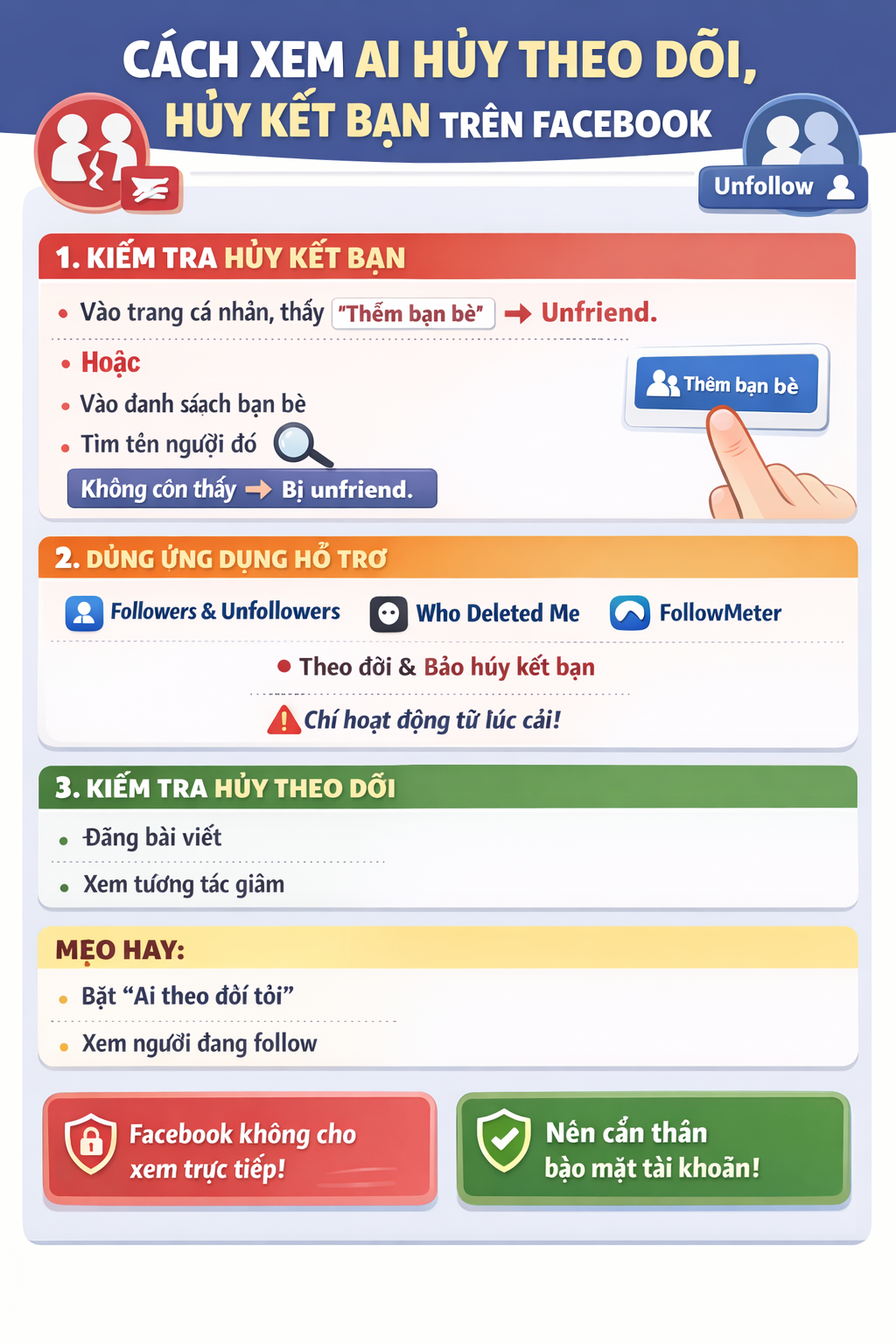

Gửi thông báo lỗi tới facebook ( Send an error report to Facebook).
Bạn thực hiện theo các bước sau:
Bước 1: Truy cập vào đường link hỗ trợ của facebook: https://www.facebook.com/help/contact/283958118330524 và điền thông tin vào form.
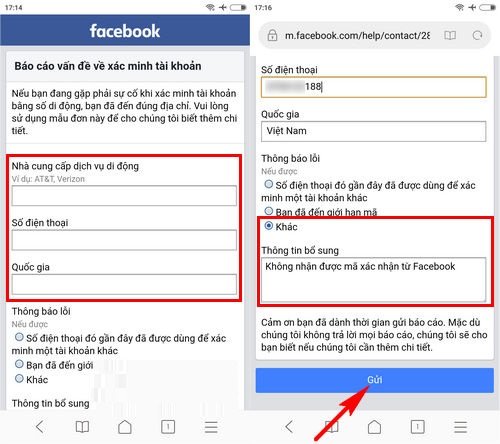
Lưu ý: với phần thông tin bổ sung bạn có thể yêu cầu như sau: Không nhận được mã xác nhận từ facebook hoặc ghi tiếng anh “I have requested confirmation code from facebook but I still have not received”
Bước 2: Nhấn “Gửi” và chờ đợi tin nhắn phản hồi từ facebook
Trên đây là những cách thức tham khảo giúp bạn khắc phục lỗi không nhận được mã gửi về từ facebook, chúc bạn thành công với một trong những cách làm trên.
THANKS FOR READINGS !
================.
English version :
Send an Error Report to Facebook
Please follow the steps below:
Step 1:
Visit Facebook’s support link: https://www.facebook.com/help/contact/283958118330524 and fill in the form.
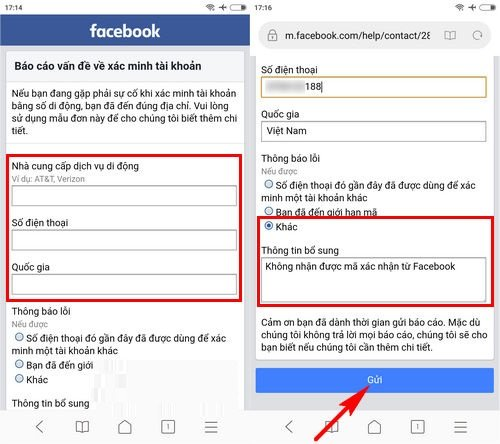
Note: In the “Additional Information” section, you can write something like: “I have requested a confirmation code from Facebook but I still have not received it.”
Step 2:
Click “Submit” and wait for a response from Facebook.
The above methods are suggestions to help you fix the issue of not receiving the verification code from Facebook. Wishing you success with one of the solutions provided.
google.com, pub-3736206267795453, DIRECT, f08c47fec0942fa0
HOẶC CÁCH KHÁC :
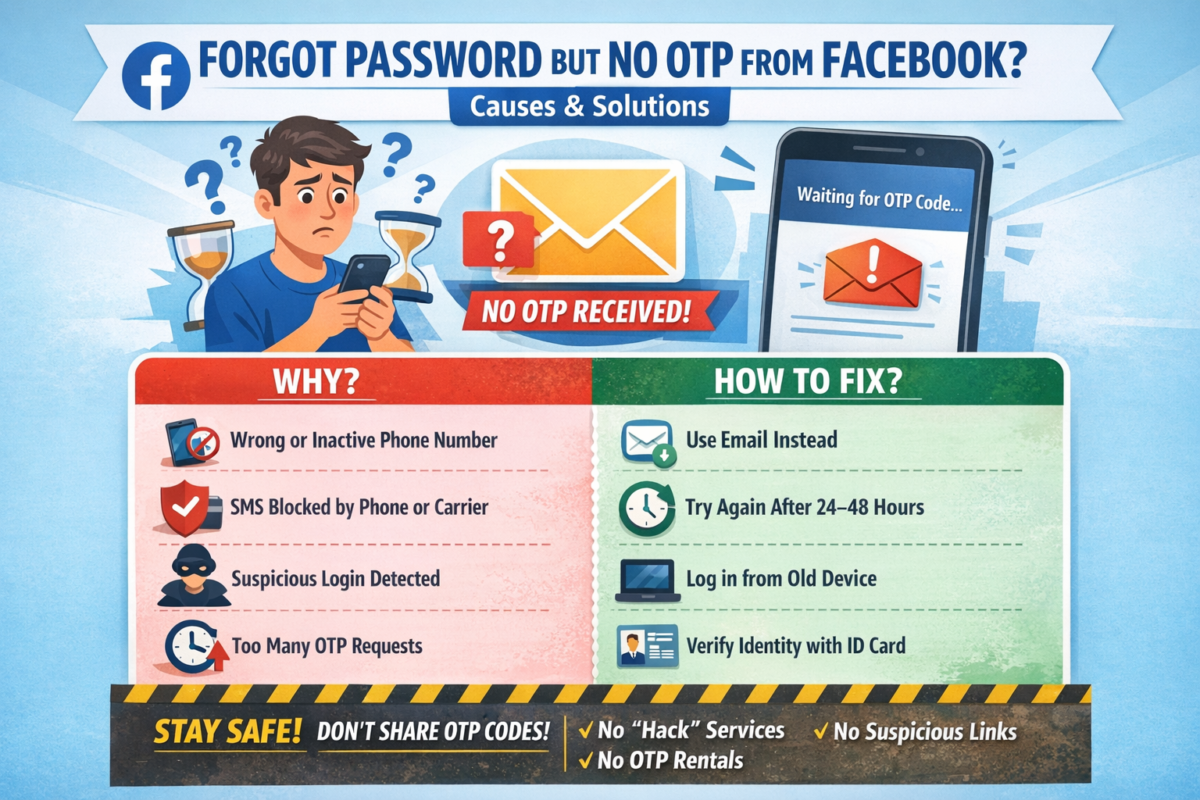
BẤM QUÊN MẬT KHẨU NHƯNG FACEBOOK KHÔNG GỬI MÃ OTP VỀ ĐIỆN THOẠI & CÁCH KHẮC PHỤC
Bạn đang cố gắng lấy lại mật khẩu Facebook, đã bấm “Quên mật khẩu” nhưng chờ mã OTP hoài không thấy gửi về điện thoại? 😥
Đây là lỗi rất nhiều người gặp phải và hoàn toàn có cách xử lý.
Bài viết này sẽ giúp bạn hiểu nguyên nhân và cách khắc phục nhanh chóng, hiệu quả.
1. Dấu hiệu Facebook không gửi mã OTP
- Không nhận được tin nhắn SMS chứa mã xác minh
- Facebook báo: “Chúng tôi đã gửi mã nhưng bạn chưa nhận được”
- Bấm gửi lại nhiều lần nhưng vẫn không có OTP
- Tài khoản bị treo ở bước xác minh
2. Nguyên nhân Facebook không gửi mã OTP về điện thoại
🔹 1. Số điện thoại đăng ký Facebook bị sai hoặc không còn sử dụng
- Đổi số điện thoại nhưng chưa cập nhật trên Facebook
- Số cũ đã hủy, mất sim
🔹 2. Điện thoại chặn tin nhắn từ Facebook
- Máy bật chặn SMS rác
- Nhà mạng chặn tin nhắn quốc tế hoặc tin nhắn tổng đài
🔹 3. Facebook nghi ngờ đăng nhập bất thường
- Đăng nhập từ thiết bị lạ
- Đăng nhập ở địa chỉ IP khác
→ Facebook tạm thời chặn gửi OTP
🔹 4. Gửi OTP quá nhiều lần trong thời gian ngắn
- Bấm “Gửi lại mã” liên tục
→ Facebook khóa tạm tính năng gửi mã
🔹 5. Lỗi hệ thống Facebook
- Facebook bị lỗi hoặc quá tải (rất hay xảy ra)
3. Cách khắc phục lỗi không nhận được mã OTP Facebook
✅ Cách 1: Kiểm tra lại sóng & tin nhắn điện thoại
- Tắt/bật chế độ máy bay
- Khởi động lại điện thoại
- Kiểm tra hộp thư Spam / Tin nhắn rác
✅ Cách 2: Đợi 24 – 48 giờ rồi thử lại
👉 KHÔNG bấm gửi mã liên tục
Sau 1–2 ngày, Facebook thường sẽ cho gửi lại OTP.
✅ Cách 3: Đăng nhập bằng email thay vì số điện thoại
Nếu tài khoản có email:
- Chọn “Quên mật khẩu”
- Chọn Xác minh qua Email
- Lấy mã trong email để đặt lại mật khẩu
✅ Cách 4: Dùng thiết bị & mạng từng đăng nhập Facebook trước đó
- Đăng nhập trên điện thoại cũ / máy tính cũ
- Dùng wifi quen thuộc
→ Tỷ lệ nhận OTP cao hơn
✅ Cách 5: Xác minh danh tính với Facebook (cách hiệu quả nhất)
Nếu không còn nhận OTP:
- Truy cập:
👉 https://www.facebook.com/help/contact/183000765122339 - Tải lên CMND/CCCD/Hộ chiếu
- Nhập email mới (chưa từng dùng cho Facebook)
- Chờ Facebook phản hồi (1–7 ngày)
4. Những lưu ý quan trọng khi lấy lại tài khoản Facebook
⚠️ Không dùng dịch vụ “hack Facebook”, “nhận OTP thuê”
⚠️ Không bấm link lạ gửi qua Messenger / SMS
⚠️ Không nhập mã OTP cho bất kỳ ai
👉 Rất dễ mất tài khoản vĩnh viễn nếu làm sai.
5. Cách tránh lỗi không nhận OTP Facebook trong tương lai
✔️ Luôn cập nhật email & số điện thoại chính xác
✔️ Bật xác thực 2 yếu tố (2FA)
✔️ Lưu sẵn mã khôi phục
✔️ Không đăng nhập Facebook trên thiết bị lạ
6. Kết luận
Việc Facebook không gửi mã OTP về điện thoại là lỗi phổ biến và hoàn toàn có thể xử lý được nếu bạn làm đúng cách.
Hãy kiên nhẫn, làm theo từng bước ở trên để lấy lại tài khoản an toàn.
Nếu bạn cần hướng dẫn chi tiết theo từng trường hợp cụ thể, hãy để lại bình luận hoặc liên hệ quản trị website để được hỗ trợ 👍
=================.
- ENGLISH VERSION :
CLICKED “FORGOT PASSWORD” BUT FACEBOOK DOESN’T SEND OTP CODE TO YOUR PHONE? CAUSES & SOLUTIONS
Have you tried to recover your Facebook password, clicked “Forgot Password”, but never received the OTP verification code on your phone? 😓
This is a very common issue, and there are effective ways to fix it.
In this article, we’ll explain why Facebook doesn’t send the OTP and how to recover your account safely.
1. Signs Facebook Is Not Sending the OTP Code
- No SMS message with the verification code
- Facebook says “We sent a code, but you haven’t received it”
- Resending the code multiple times but nothing arrives
- Account stuck at the verification step
2. Common Reasons Why Facebook Doesn’t Send OTP
🔹 1. Incorrect or inactive phone number
- Phone number was changed but not updated on Facebook
- Old SIM card is no longer active
🔹 2. Phone blocks Facebook SMS messages
- SMS spam filter enabled
- Carrier blocks international or system messages
🔹 3. Suspicious login activity detected
- Logging in from a new device or location
- Different IP address than usual
→ Facebook temporarily blocks OTP delivery
🔹 4. Too many OTP requests in a short time
- Clicking “Resend code” repeatedly
→ Facebook temporarily disables OTP sending
🔹 5. Facebook system error
- Server overload or temporary Facebook outage
3. How to Fix Facebook OTP Not Received Issue
✅ Method 1: Check your phone and network
- Turn Airplane Mode on/off
- Restart your phone
- Check Spam / Junk SMS folder
✅ Method 2: Wait 24–48 hours and try again
⚠️ Do NOT request OTP repeatedly
After 1–2 days, Facebook usually allows OTP again.
✅ Method 3: Recover account using email instead
If your account is linked to an email:
- Click Forgot Password
- Choose Verify via Email
- Use the email code to reset your password
✅ Method 4: Log in from a previously used device or network
- Use an old phone or computer
- Connect to a familiar Wi-Fi network
👉 This significantly increases OTP success rate
✅ Method 5: Verify your identity with Facebook (Most effective)
If OTP still doesn’t arrive:
- Visit:
👉 https://www.facebook.com/help/contact/183000765122339 - Upload your ID (Passport / Driver’s License / National ID)
- Enter a new email address (never used on Facebook)
- Wait for Facebook’s response (1–7 business days)
4. Important Warnings When Recovering Facebook Accounts
⚠️ Do NOT use “Facebook hacking” or “OTP rental” services
⚠️ Do NOT click suspicious links sent via SMS or Messenger
⚠️ Never share OTP codes with anyone
👉 These can permanently lock or lose your account.
5. How to Prevent Facebook OTP Issues in the Future
✔️ Keep your phone number and email updated
✔️ Enable Two-Factor Authentication (2FA)
✔️ Save backup recovery codes
✔️ Avoid logging in on unknown devices
6. Conclusion
The issue of Facebook not sending OTP codes is common but completely fixable if you follow the correct steps.
Stay patient, follow the methods above, and you can recover your Facebook account safely.
If you need step-by-step support for your specific case, feel free to contact the website administrator for assistance.
23931Đánh giá
Рейтинг i442v
Идеальный ответ Сегодня медицинское качество играет ключевую роль в подборе специалиста. Рейтинг проктологов, [url=https://profi-co.ru/sostavru/zhenshini-proctologi]Рейтинг проктологов[/url] помогает найти надёжного врача, что крайне важно для здоровья. Обращаясь к лучшим, вы увеличиваете шансы на успешное лечение.
walmart online pharmacy 299 mg
http://mexpharmx.shop/# no prescription online pharmacy
legit canadian pharmacy 163 mg
legitimate online pharmacy usa! [url=http://caypharm.shop/#]rx pharmacy online[/url] great web site.
! w195a
Exploring new opportunities is essential for growth. By choosing to visit website, [url=https://www.modernpharmabd.com/2026/09/16/online-casino-za-peniaze-vsetko-co-potrebujete-vediet-23134375/]https://www.modernpharmabd.com/2026/09/16/online-casino-za-peniaze-vsetko-co-potrebujete-vediet-23134375/[/url], you can discover valuable resources and insights. Take a moment to engage with the content available. Knowledge gained can change your perspective and boost your understanding.
casino payments and bonus
Mostly a reader, rarely post, thought I would drop my short checklist for choosing a casino site. After getting burned once or twice I stopped going by ads alone. First thing is the licence: check who regulates the site, and whether they actually accept players from your country. After that I look at banking: crypto is a plus but not a must, and there should be no weird fees on cashouts. Never judge a site by the bonus alone. Wagering of 35x or 40x is normal, and some games count less towards it. A decent independent write-up with the current terms is here [url=https://tdmromania.ro/member.php?action=profile&uid=21951]read more[/url] and it saved me some time. Most of my sessions are on mobile, so I check how the lobby works on a small screen. Support matters too: slow or scripted answers usually mean trouble later. Anyway, that is my routine. Treat it as entertainment, not income.
casino payments and bonus
Long time lurker here, so here is my short checklist for choosing a casino site. After getting burned once or twice I learned to read the small print first. Licence comes first for me: check who regulates the site, because some sites quietly block certain regions. After that I look at banking: crypto is a plus but not a must, and the withdrawal limits need to be written clearly. Never judge a site by the bonus alone. Wagering of 35x or 40x is normal, and some games count less towards it. A useful overview with bonus rules, app info and payment methods is here [url=https://tudomuaban.com/chi-tiet-rao-vat/3049062/pure-casino---real-money-gaming-in-2026-a-practical-player-guide.html]learn more[/url] and it saved me some time. Most of my sessions are on mobile, so I check how the lobby works on a small screen. Ask support one simple question first: slow or scripted answers usually mean trouble later. Anyway, that is my routine. Treat it as entertainment, not income.
casino checklist
Mostly a reader, rarely post, so here is what I look at before signing up anywhere. After trying maybe a dozen sites I stopped going by ads alone. First thing is the licence: find the licence number and look it up, because some sites quietly block certain regions. Then payments: card, e-wallets and bank transfer should all be there, and the withdrawal limits need to be written clearly. The welcome offer is where most people get caught. Wagering of 35x or 40x is normal, and the bonus usually expires in a week or two. A useful overview with bonus rules, app info and payment methods is worth a read here [url=https://pbase.com/solkrypto43b1c0/lottolandfinlandrealmone18b357]Lottoland[/url] before you deposit anything. Most of my sessions are on mobile, so I check how the lobby works on a small screen. Ask support one simple question first: slow or scripted answers usually mean trouble later. Anyway, that is my routine. Set a budget and stick to it.
casino checklist
Long time lurker here, thought I would drop my short checklist for choosing a casino site. After a few bad experiences I learned to read the small print first. I always start with licensing: find the licence number and look it up, and whether they actually accept players from your country. After that I look at banking: crypto is a plus but not a must, and the withdrawal limits need to be written clearly. The welcome offer is where most people get caught. Read the wagering and the max bet rule, and some games count less towards it. A good recent review that covers all of this can be found here [url=https://www.efunda.com/members/people/show_people.cfm?Usr=martinez3e8b14]ice casino logowanie[/url] so you know what you are signing up for. On mobile I mostly use the browser version, and a good site loads fast and does not log you out every five minutes. Support matters too: if they answer in a couple of minutes that is a good sign. Hope this helps someone. Set a budget and stick to it.
2023 b400b
When it comes to gambling online, credit card casino sites, [url=https://dailycashloan.com/index.php/2026/09/04/exploring-the-world-of-credit-card-casinos-a-comprehensive-guide/]https://dailycashloan.com/index.php/2026/09/04/exploring-the-world-of-credit-card-casinos-a-comprehensive-guide/[/url] offer convenience. Players can effortlessly fund their accounts and partake in various games, including slots and table games. Credit card casino sites ensure that your payments are secure, providing a safe environment for gamers. With various options available, you can select the one that suits your requirements. Don’t miss out on the fun!
для вашего здоровья. n484b
Думаю, имеется ввиду и то, и то Проктологи Москвы, [url=https://profi-co.ru/sostavru/proctologi-moskva]Проктологи Москвы[/url] представляют высококлассное диагностику для людей с разнообразными заболеваниями нижней. Знатоки специалисты умеют оказать помощь и советы при существующих проблемах.